
Products
Kargon™ and KargonLite™
One platform, three solutions: KargonLite™ brings trip, freight and fleet management to carriers moving full and partial truckloads, plus customs, CMR and foreign-currency freight for export, import and transit trips; Kargon™ covers consignment receipts, transfer hubs, delivery assignment and inter-branch settlement for groupage depot carriers.

 Triyon Yazılım's logistics product brand
Our logistics software: Kargonsoft
Kargon™ is developed under Kargonsoft, Triyon Yazılım's logistics product brand. Explore solutions, modules and screenshots for LTL, full truckload, international, forwarding and warehouse operations at kargonsoft.com.
Visit kargonsoft.com- LTL and Depot Networks — Partial loads (LTL) and branch networks.
- Full Truckload (FTL) and Tonnage — Full truckload and tonnage transport.
- International — Export, import and transit transport.
- Forwarder — Freight forwarding.
- Warehousing (WMS) — Warehousing and 3PL services.
Three editions
The right edition for your operation
Pick the tab that matches your operation; the product, screens and modules change accordingly.
KargonLite™
For logistics and transport companies
Built for full truckload (FTL) carriers, fleet owners and warehouse operations. Orders, transport plans, trips, fleet, current accounts and cost tracking come together on a single platform, so operations and accounting move on the same data.
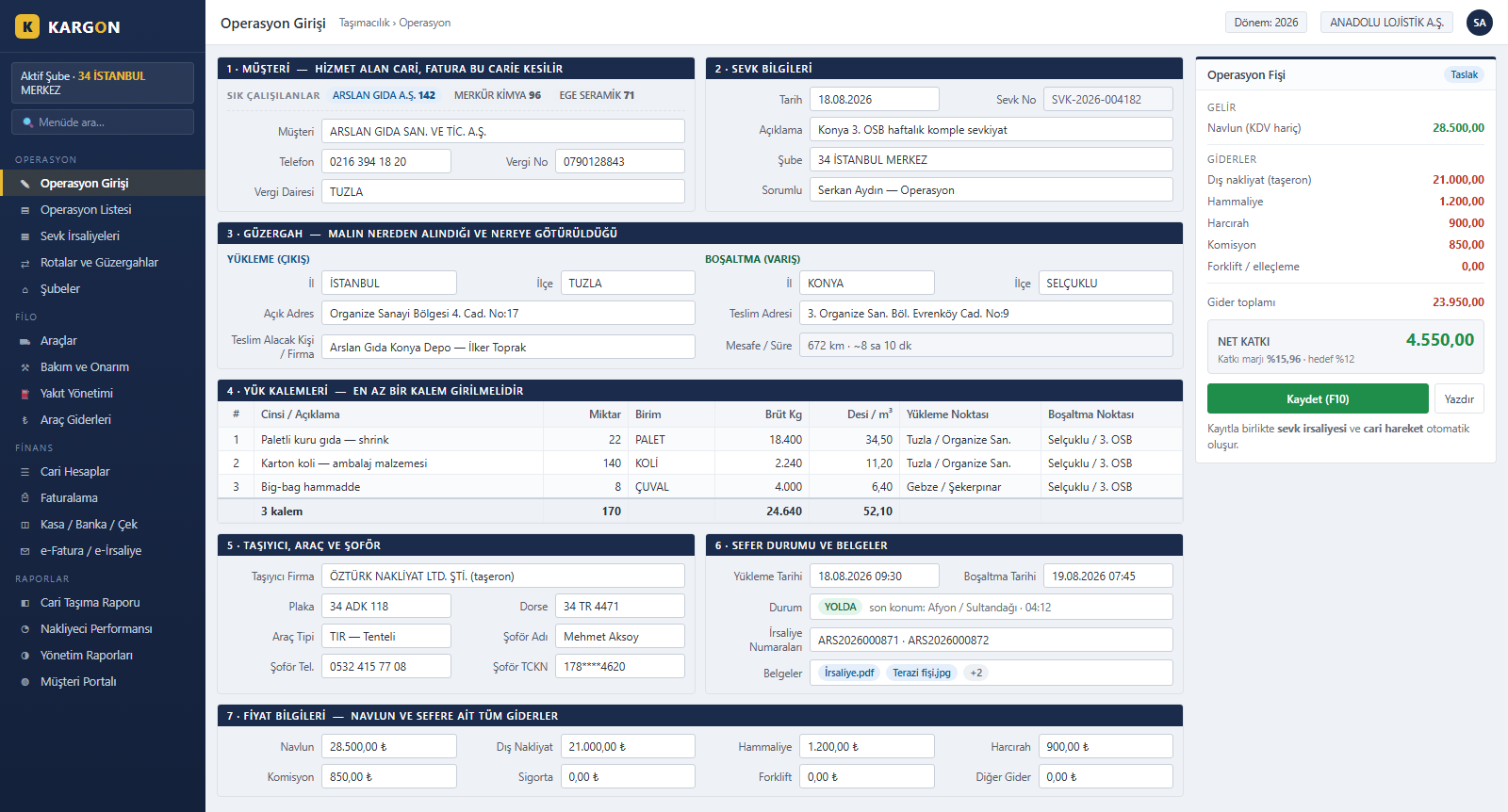
Complete Trip Entry on a Single Screen
On the KargonLite™ operation entry screen, customer, route, cargo lines, carrier, vehicle and driver details are captured in one form, and the trip record and waybill are created together. The live operation slip on the right calculates freight revenue and every trip cost instantly, showing net contribution before the record is even saved.
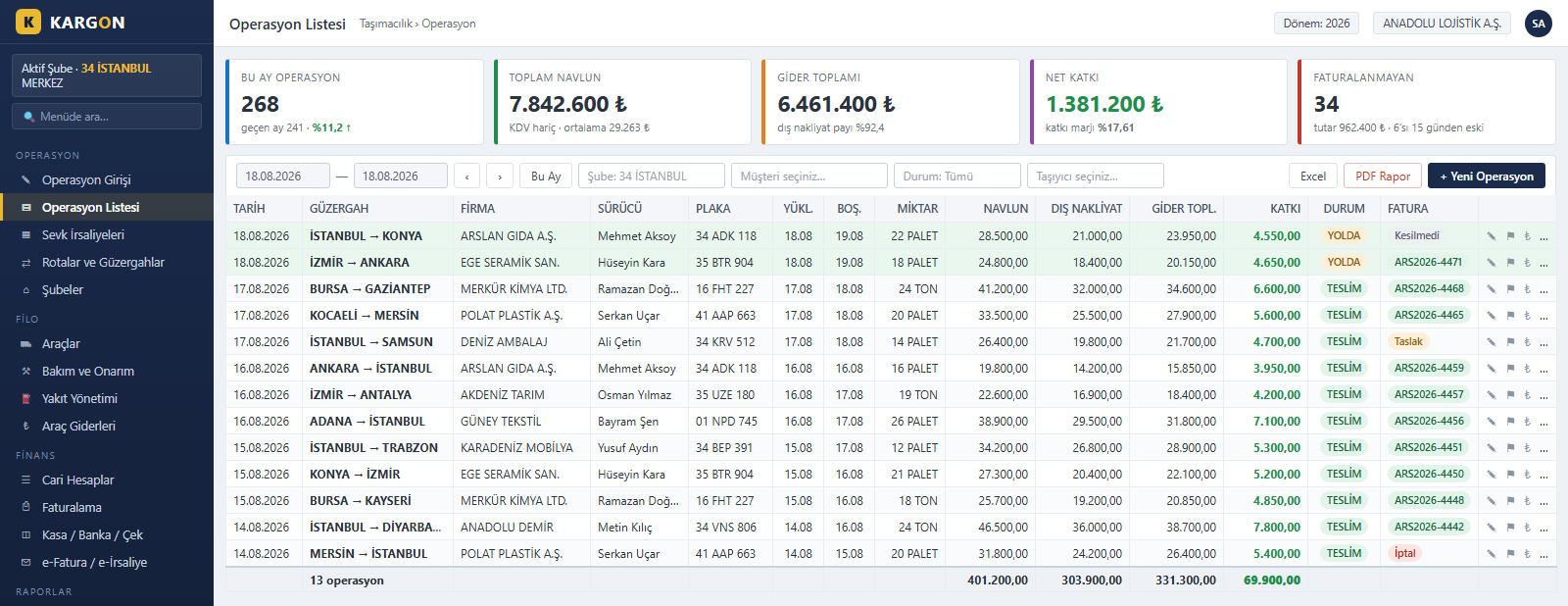
Trip List with Per-Trip Profitability
The KargonLite™ operation list shows every trip in one table with its date, route, customer, plate, driver and invoice status. Alongside freight revenue, subcontracted haulage and total cost, the net contribution of each trip appears on its own row, while filters and bulk actions make uninvoiced trips quick to find and close.
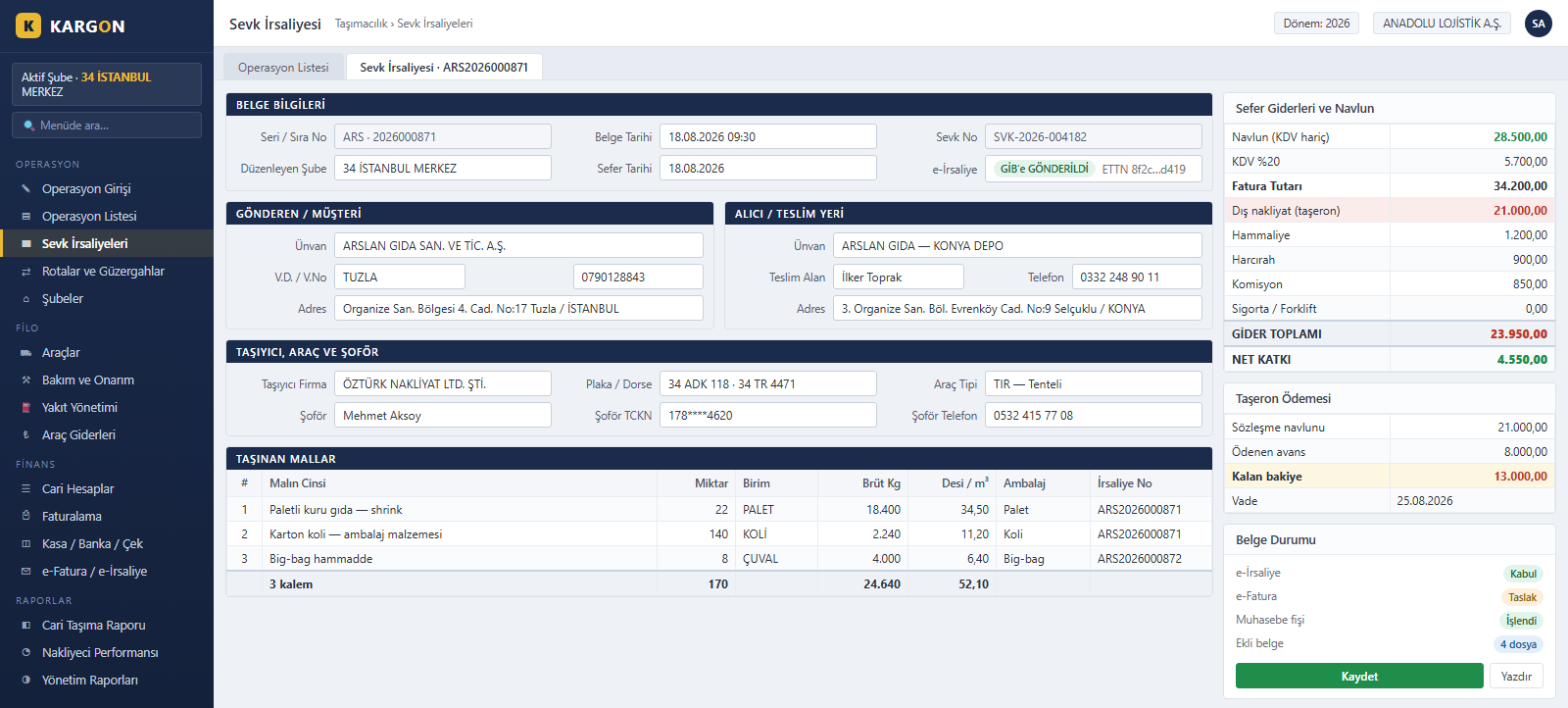
Waybills and e-Waybill Management
The KargonLite™ waybill screen brings document details, consignor and consignee accounts, carrier, vehicle and driver data and the goods carried onto a single page. Freight revenue, trip costs and the subcontractor's payable are tracked from the same screen; the e-waybill is filed with the tax authority and the ledger entry is created automatically.
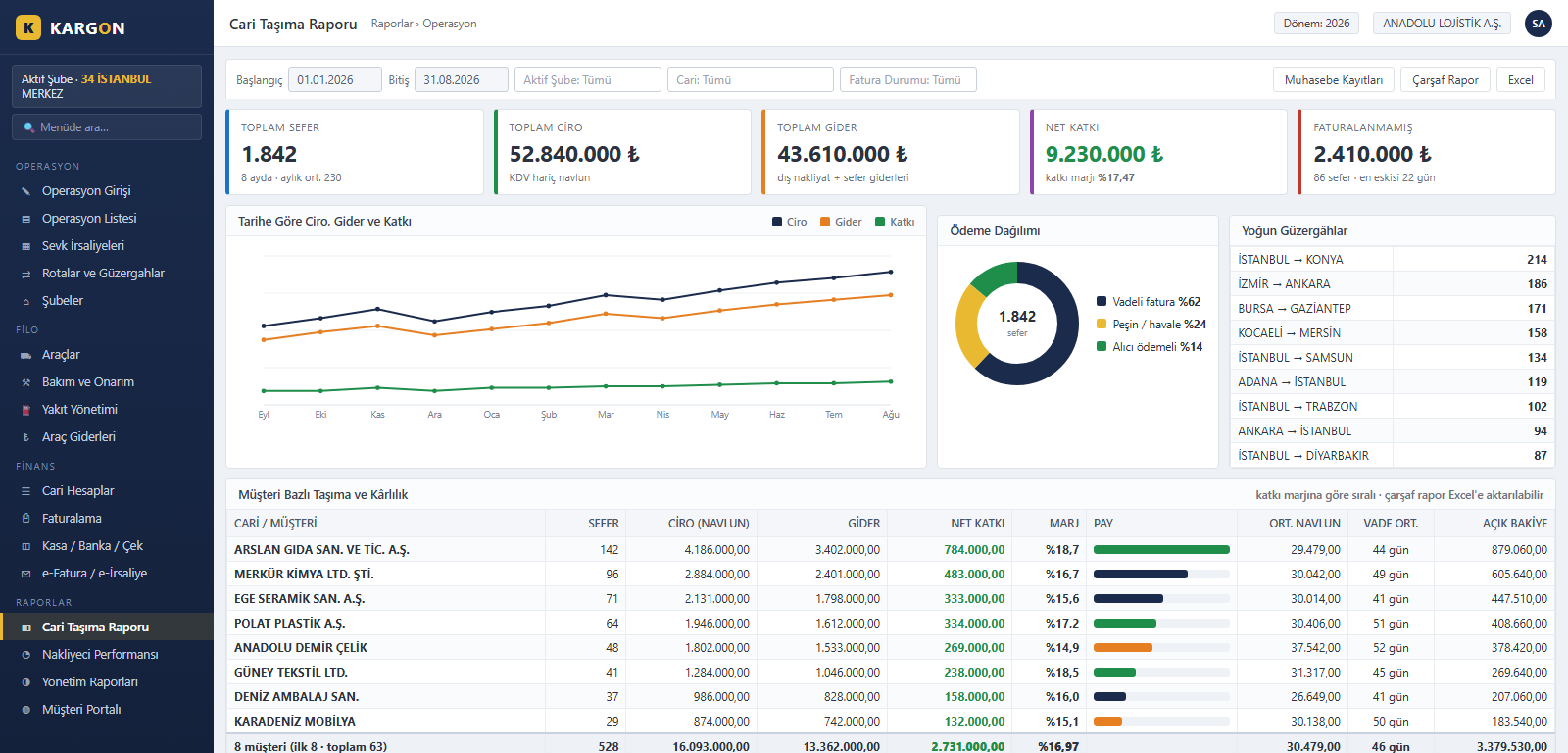
Customer Transport and Profitability Report
The KargonLite™ customer transport report lays each customer's trip count, revenue, cost and net contribution side by side. Revenue-cost-contribution trends over time, the busiest lanes and the payment mix are shown as charts, so the margin column reveals which customers actually earn money — independently of who ranks highest on revenue.
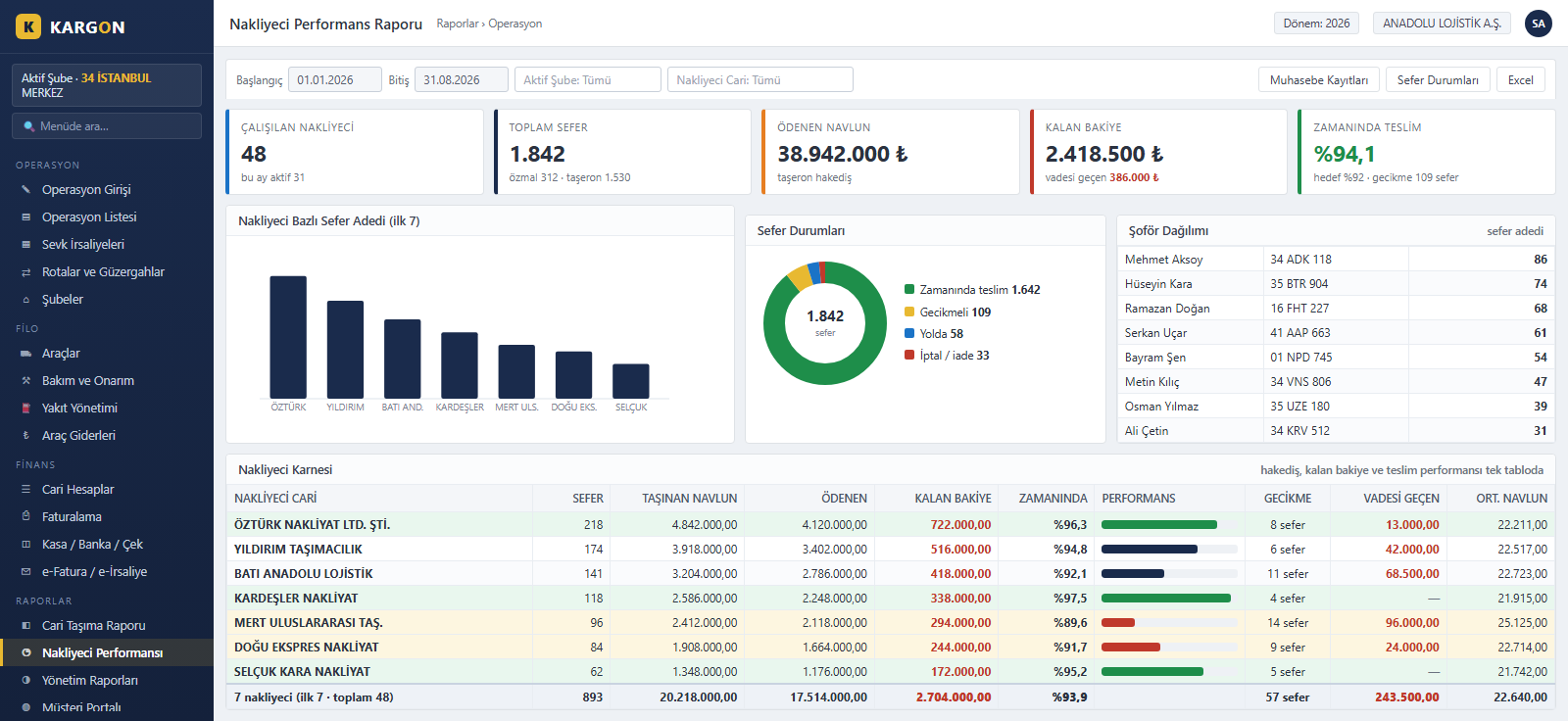
Carrier Performance and Payable Tracking
The KargonLite™ carrier performance report scores every subcontractor and owner-operator you work with on trip count, freight carried, amount paid and outstanding balance. On-time delivery rate, delay count and overdue balance sit in one table, so carrier selection and rate negotiation are backed by data rather than memory.
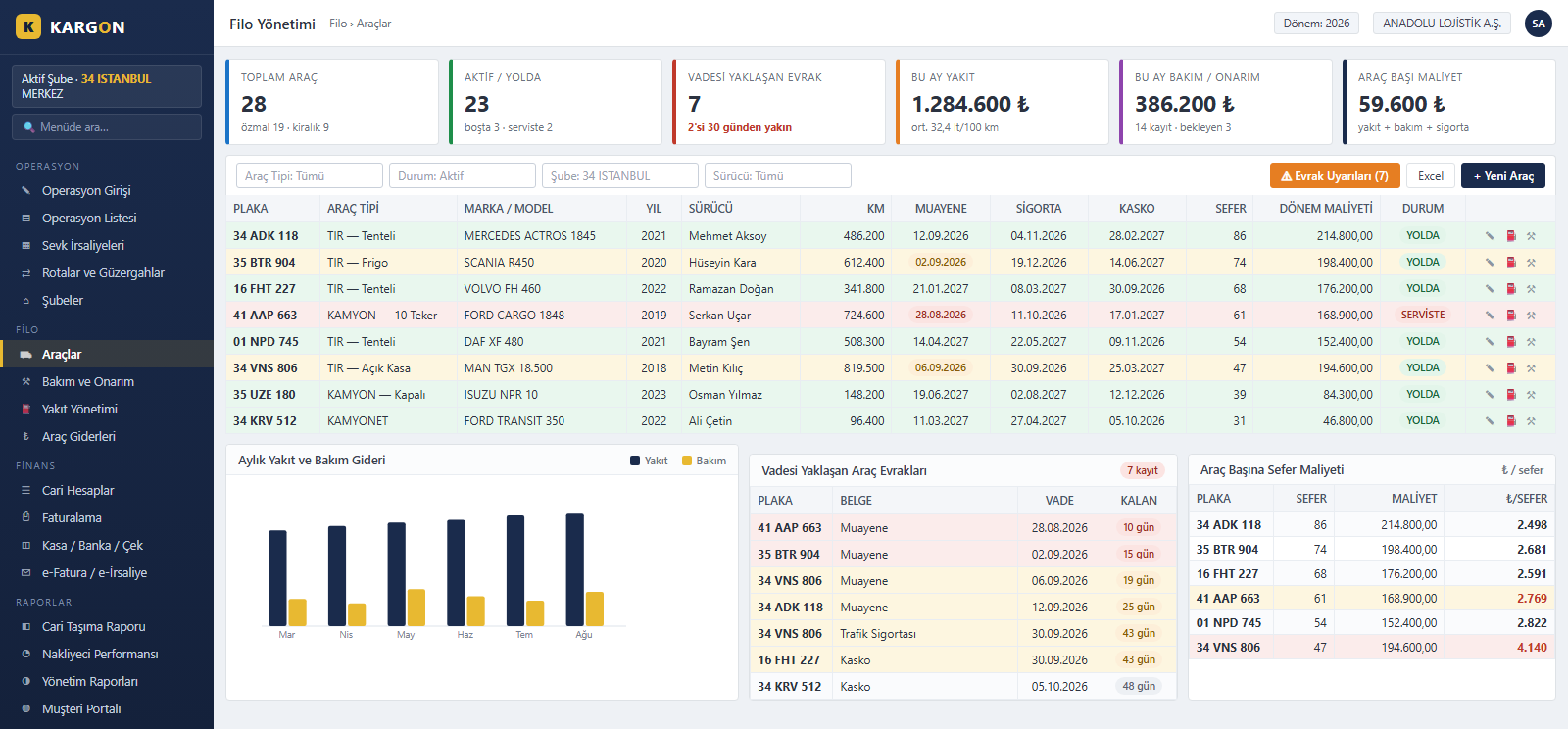
Fleet, Fuel and Vehicle Document Tracking
KargonLite™ fleet management lists owned and rented vehicles with mileage, driver, trip count and period cost. Inspection, traffic insurance and comprehensive cover expiry dates are surfaced as colour-coded warnings, while fuel and maintenance spend is converted into a cost-per-trip figure that exposes the vehicles losing money.
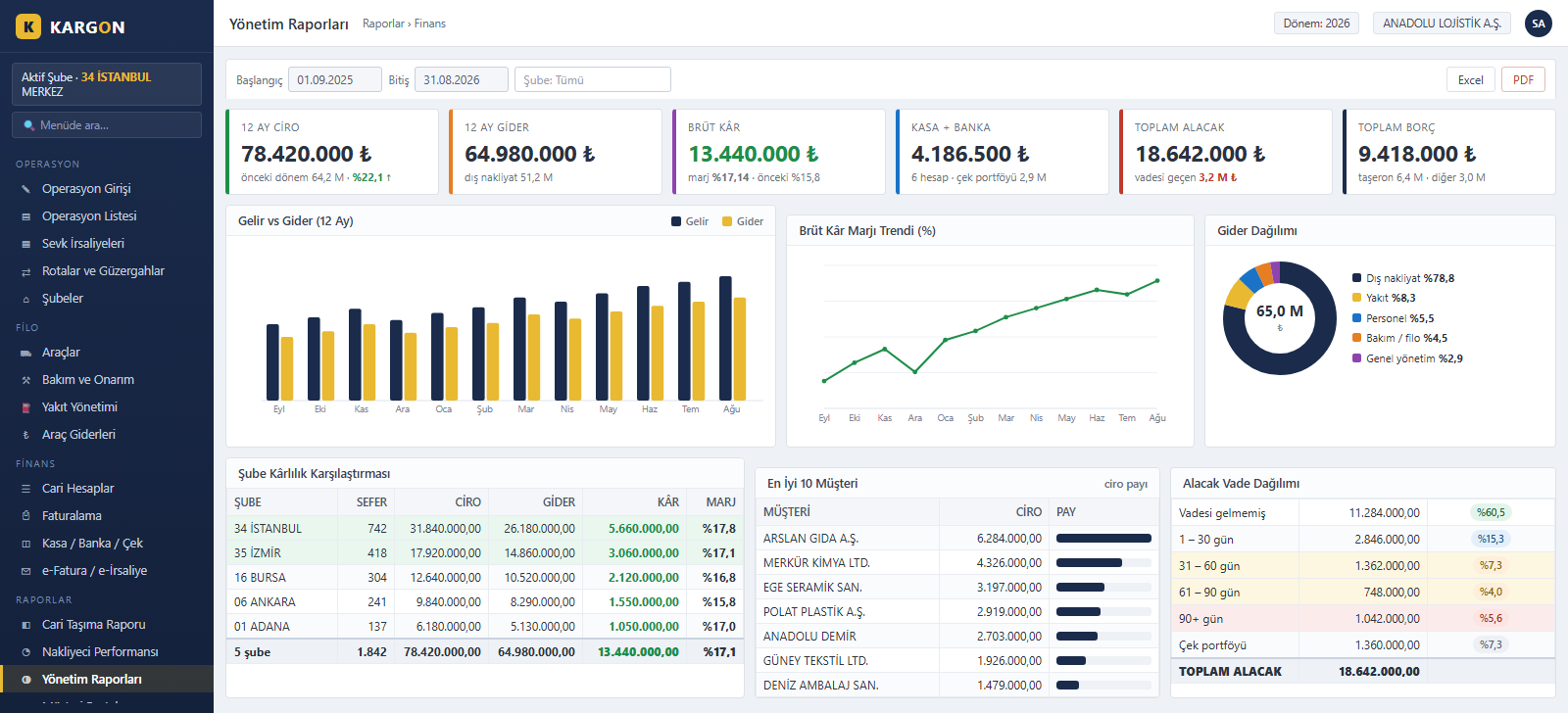
Management Reports and Financial Dashboard
KargonLite™ management reports gather twelve months of revenue and cost, the gross margin trend and the expense breakdown into one panel. Branch profitability is compared, top-earning customers are ranked, and receivables are aged into maturity bands so collection risk becomes visible before it turns into a delay.
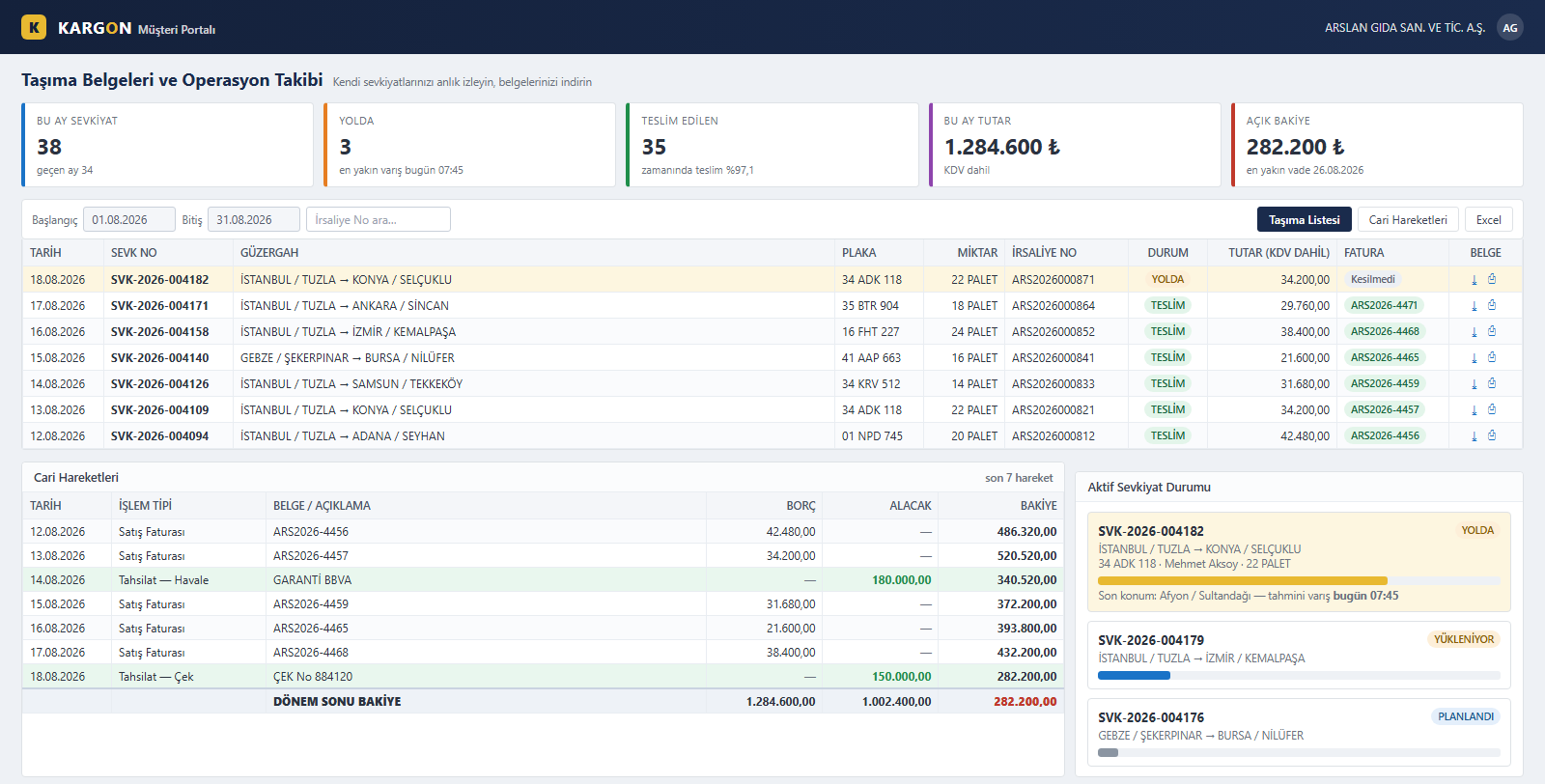
A Self-Service Portal for Your Customers
The KargonLite™ customer portal lets your customers follow their own shipments by trip number, route, plate and delivery status. Waybills and invoices are downloaded straight from the portal and account movements with the open balance are visible at any moment, which noticeably cuts the “where is my load” calls reaching your operations team.
All Modules on One Screen
KargonLite™ unites operation entry, waybills, route and branch management, fleet (vehicles, fuel, maintenance, vehicle costs), customer accounts, invoicing, cash-bank-cheque, e-invoicing and management reporting on a single platform. Operations, accounting and management work on the same data, so a trip entered once flows into documents and the ledger on its own.
Kargon™
For groupage and depot carriers
Built for depot carriers that move partial loads across a branch and agency network. From the moment you issue a consignment receipt, through loading onto a vehicle, passing a transfer hub, being assigned to a courier for the consignee and closing inter-branch settlement at period end, the whole chain runs on one platform.
Consignment Receipt and Acceptance Details
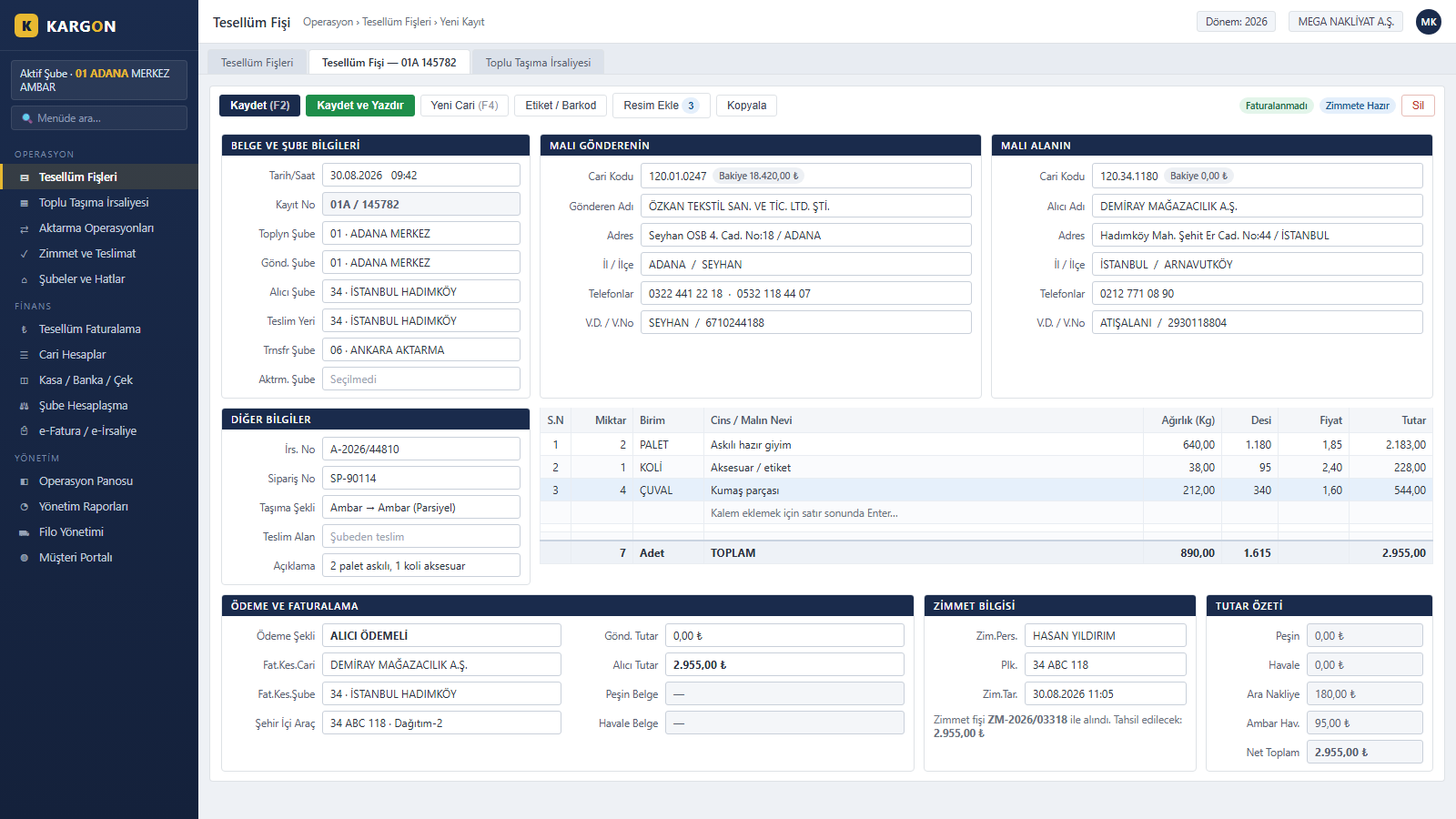
Sender and consignee account details, the collecting–sending–receiving–transfer–hub branch chain and line-level quantity, weight, volumetric weight and amount are entered on a single screen. As soon as the account code is typed, the title, address and tax details fill in; the payment method determines which account and branch gets invoiced. A receipt that has been invoiced or linked to a waybill cannot be deleted.
Bulk Transport Waybill and Linking
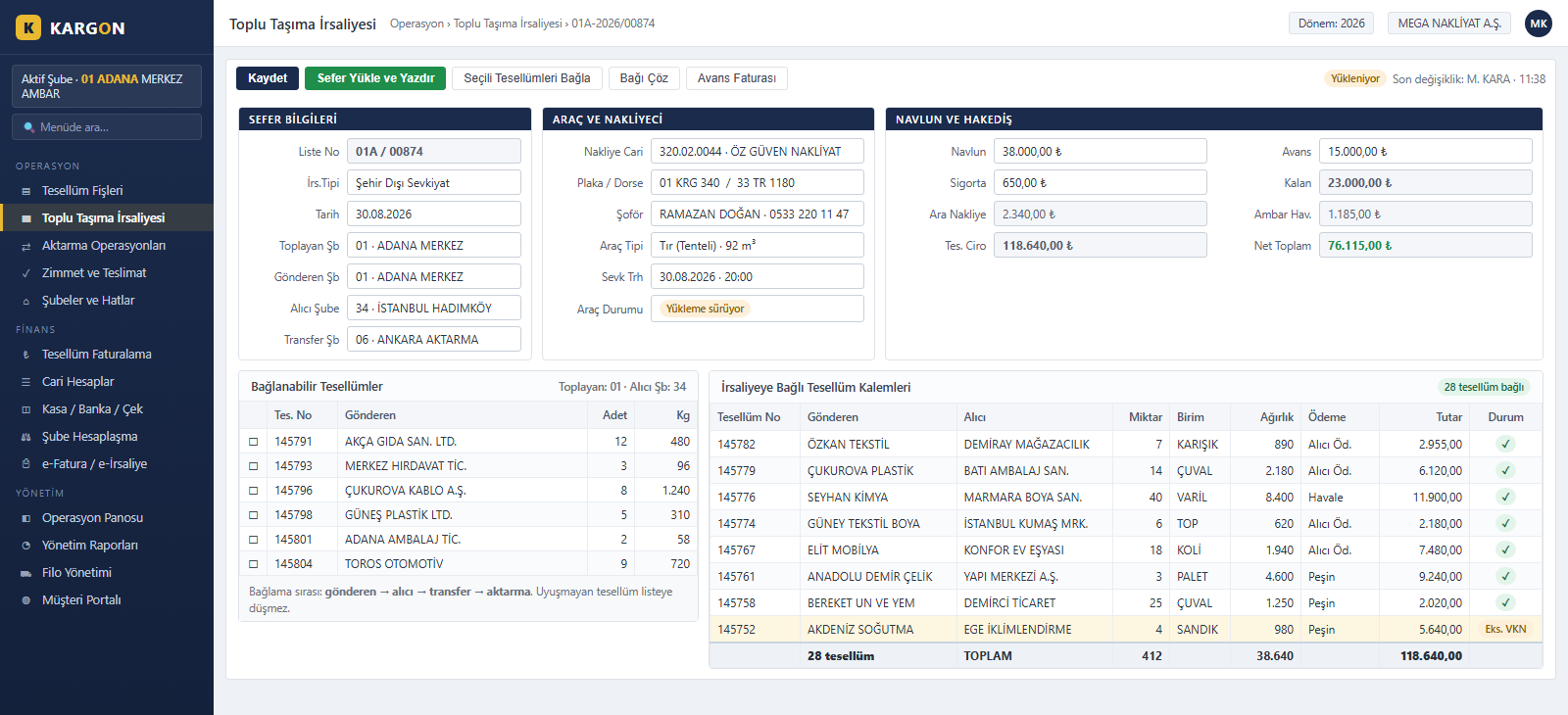
Dozens of consignments loaded onto one vehicle are gathered into a single document. Linking follows the sender→receiver→transfer→hub sequence; a consignment whose branch chain does not match never appears in the list and cannot be loaded onto the wrong trip. Carrier account, plate, driver, freight charge, advance and balance are written onto the waybill, and counts, weights and amounts total instantly.
Transfer Hubs and Line-Based Trip Tracking
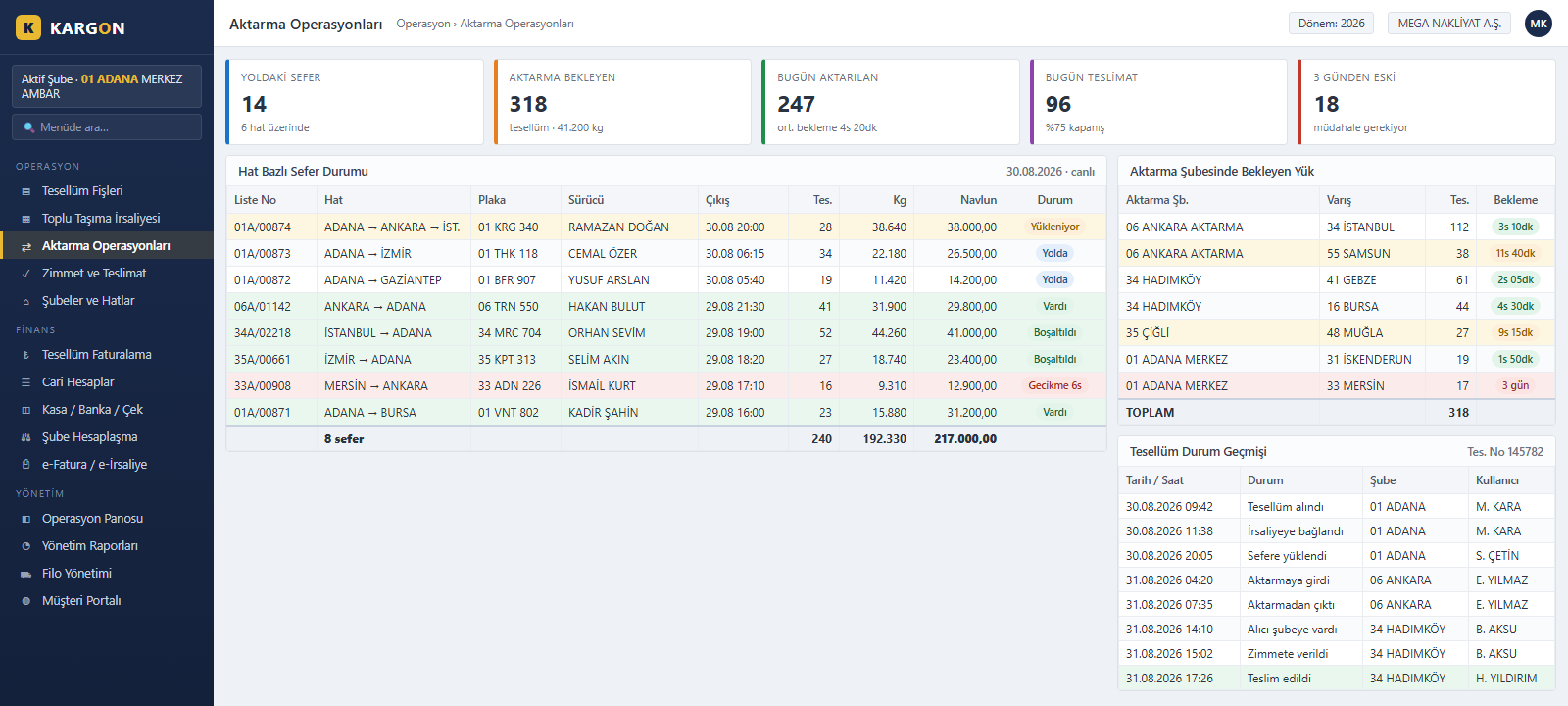
One table shows which trip is where, on which plate, with how many consignments and how many kilos; loading, en route, arrived and delayed statuses are separated. Cargo waiting at a transfer hub is listed by destination province and waiting time. The status history of a single shipment is traceable by date, branch and user.
Delivery Assignment and Handover Tracking
Consignments are assigned in bulk to a delivery courier and vehicle; each row shows the total amount and the amount to be collected separately. Delivered, undeliverable and return-requested records are separated by colour. When an assignment is closed, cash-on-delivery collection is posted to the cash voucher in one step and the current account entry is created at the same time.
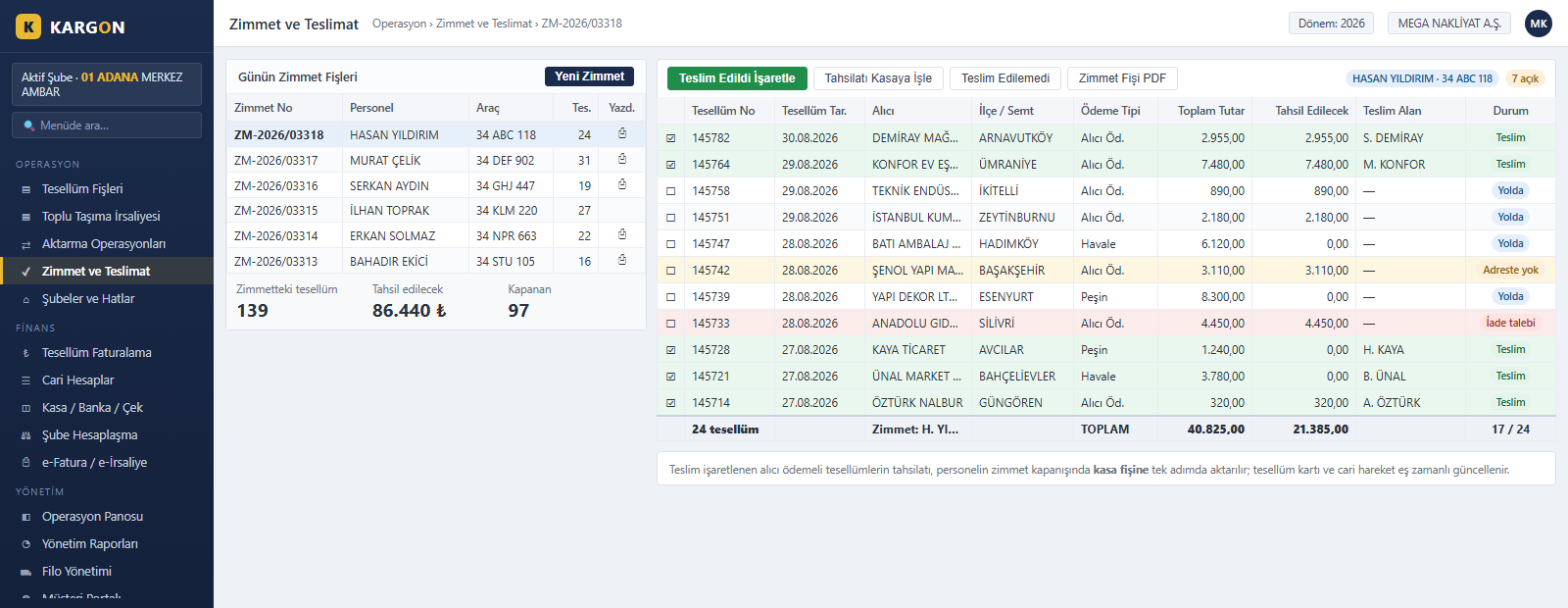
Automatic Inter-Branch Settlement
A branch pair and a period are selected, and the system pulls every trip in that period. Consignment revenue, freight charge, advance, balance, inter-branch freight transfer fee and intermediate haulage sit in separate columns; each branch's share is calculated automatically from its agreed percentage. Consignments not linked to any waybill are flagged as a warning, and the period cannot be closed until they are.
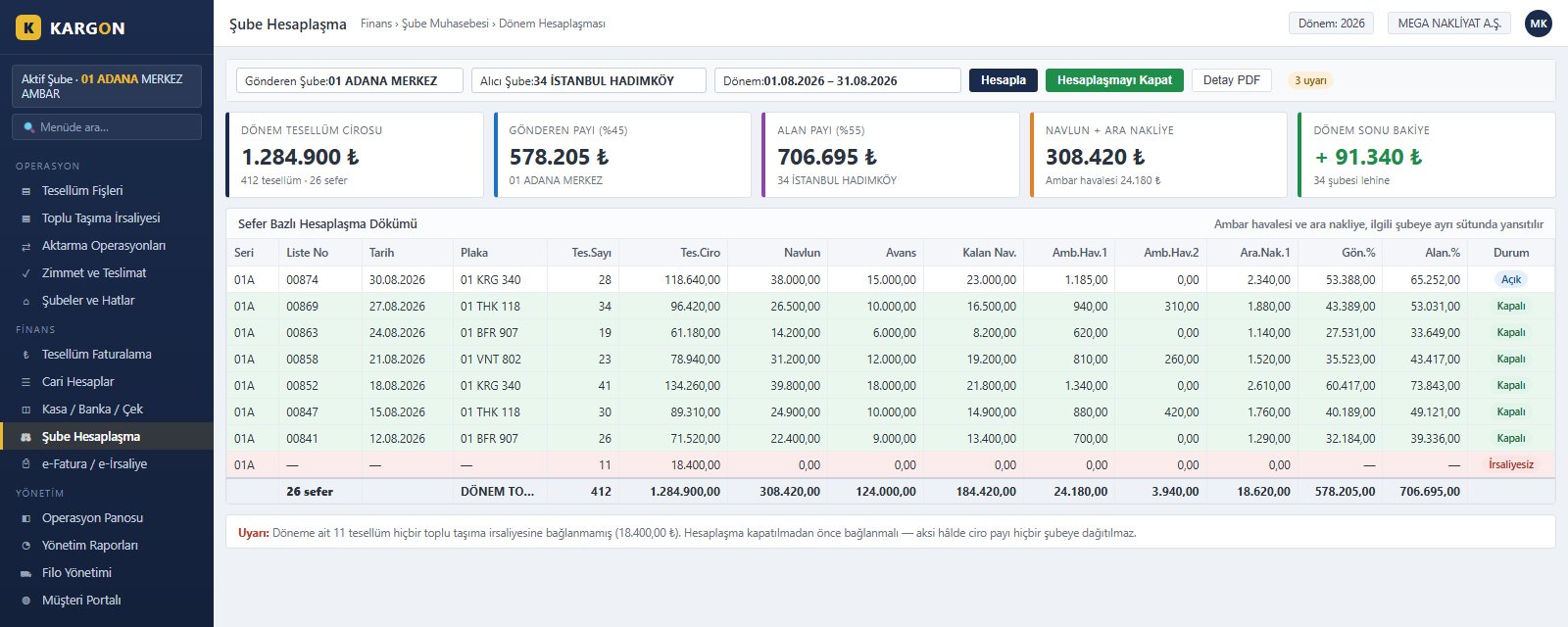
Consignment-Based Invoicing and e-Invoice
Uninvoiced consignments belonging to an account are selected and turned into a draft invoice in one action; each consignment becomes its own line with its own number. The buyer's tax number is matched against the Turkish Revenue Administration (GİB) taxpayer list, so the e-Invoice or e-Archive decision is made automatically. On a rejected document, the reversing accounting entry and consignment cancellation run by themselves.
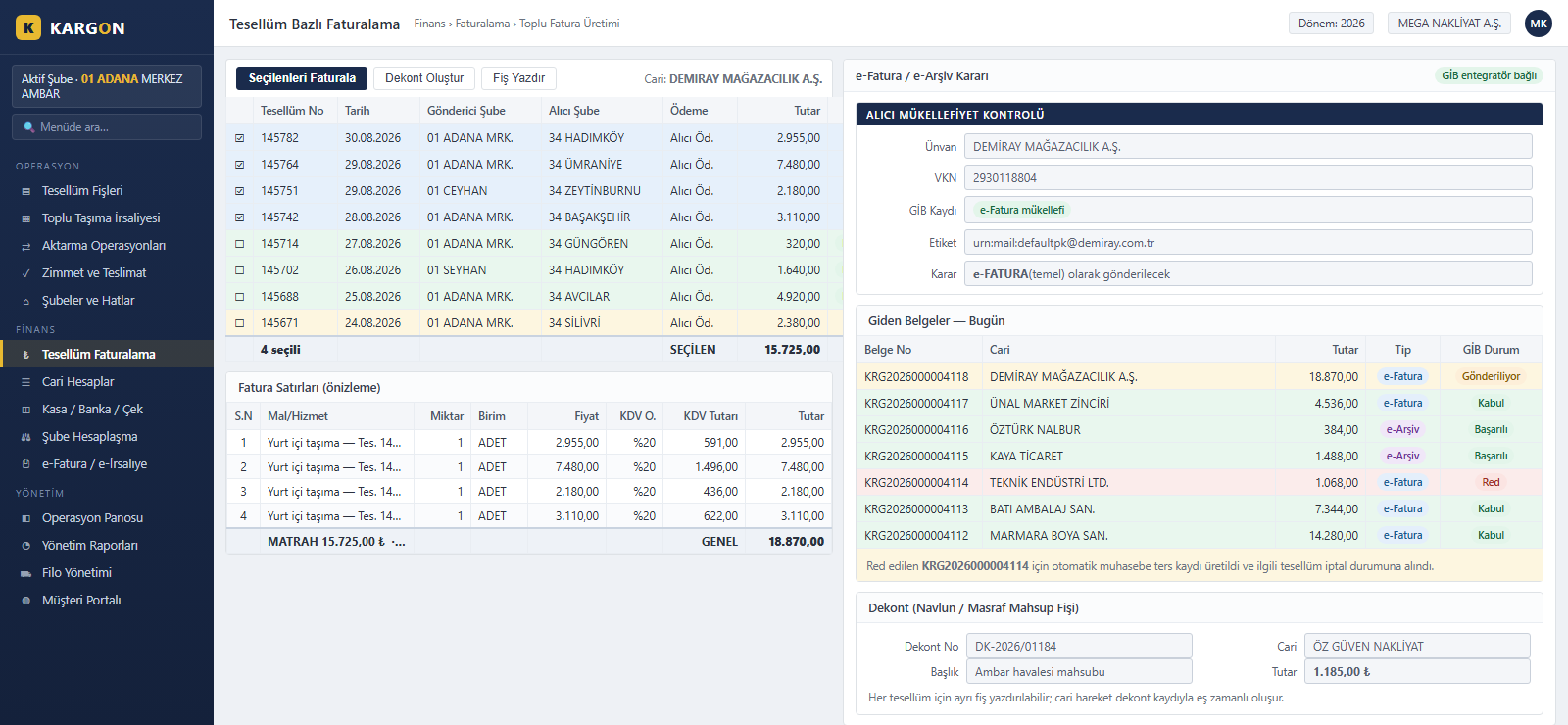
Current Account and Payable/Receivable Tracking
Sales invoices, cash and bank collections, debit notes and cheque movements are listed in a single statement together with branch information. The balance summary and maturity breakdown sit at the top of the card; the account's consignments and the cheques in portfolio are on the same screen. When a customer asks which shipments an invoice came from, the answer is one click away.
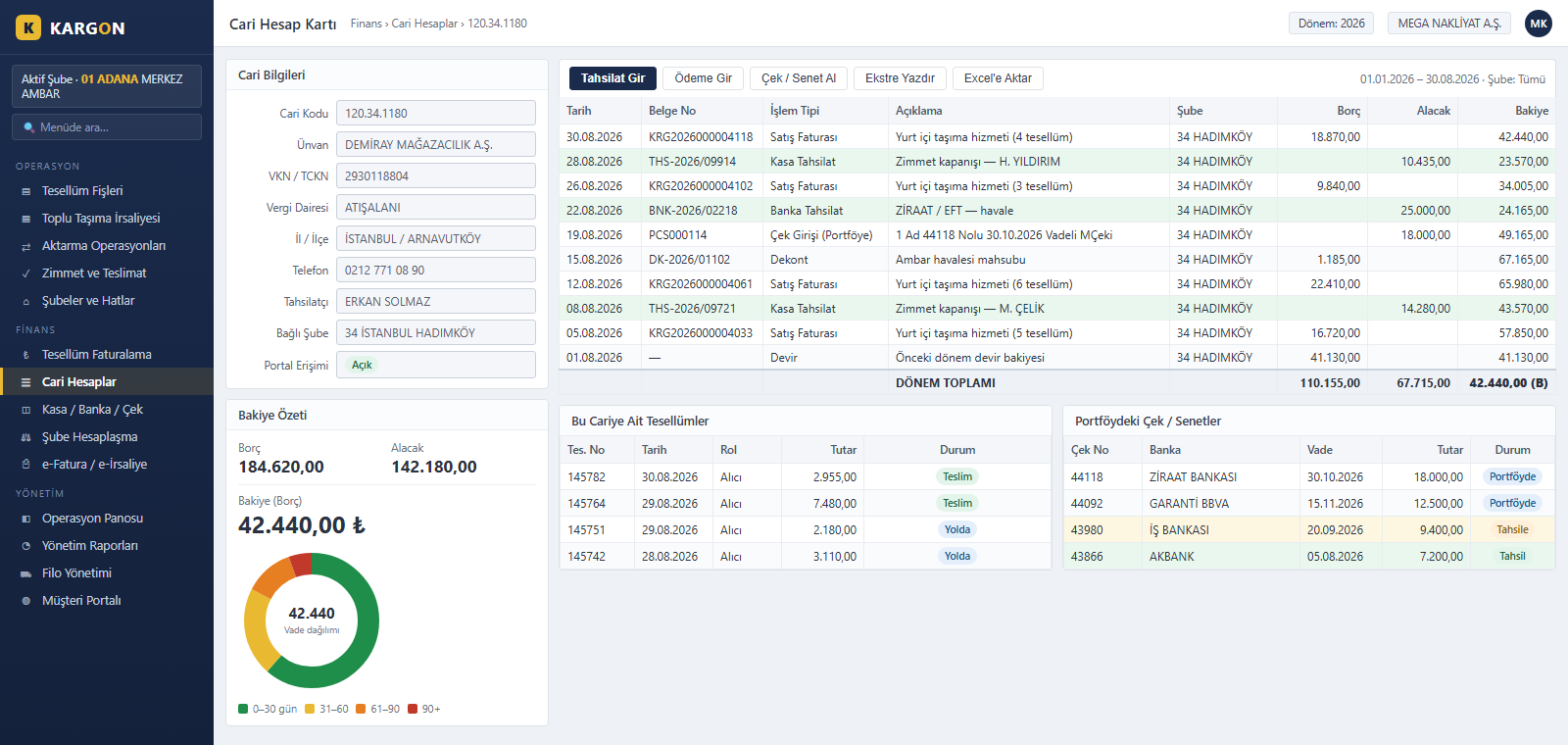
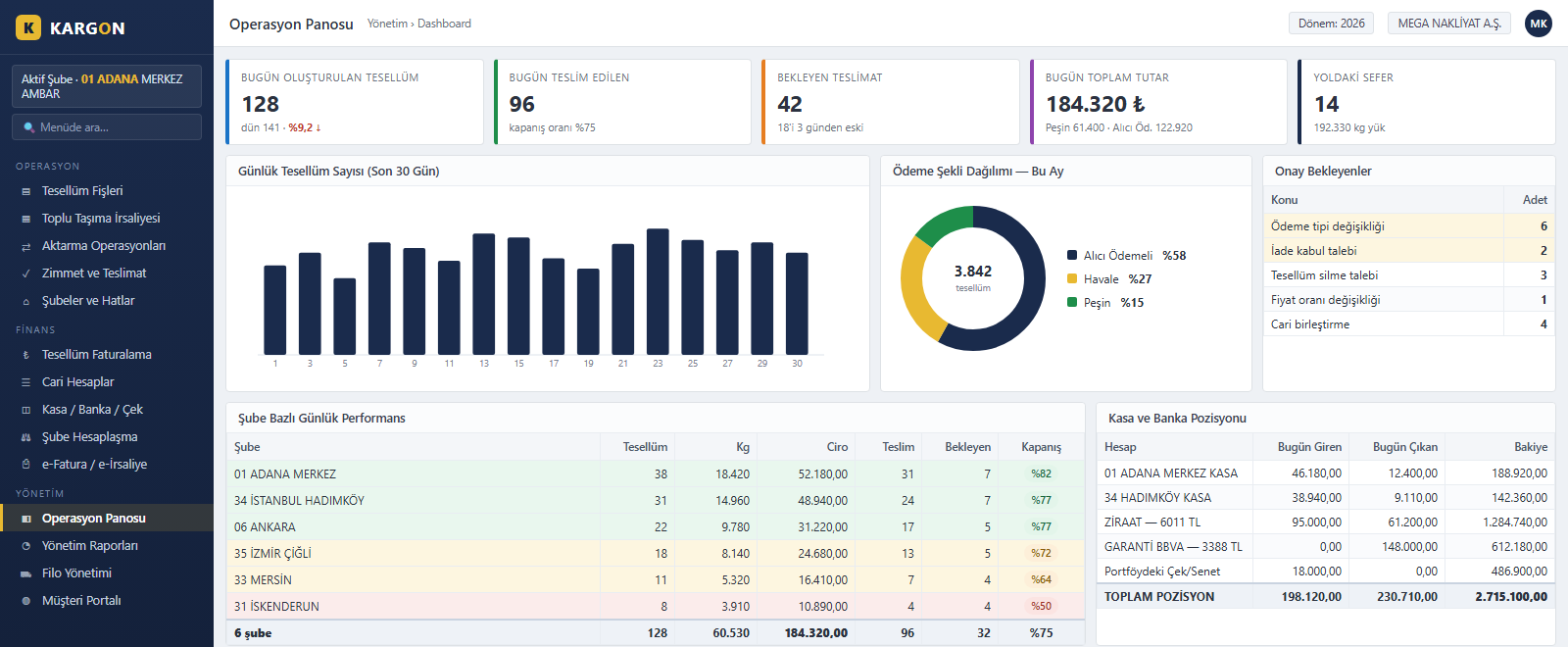
Daily Operations Dashboard
Consignments created, delivered and pending today, the day's revenue and the number of trips on the road appear on the first screen. The last thirty days of consignment volume, the payment-method split and a branch-level performance table are on the same page. Pending approvals and the cash, bank and cheque position are summarised in separate boxes.
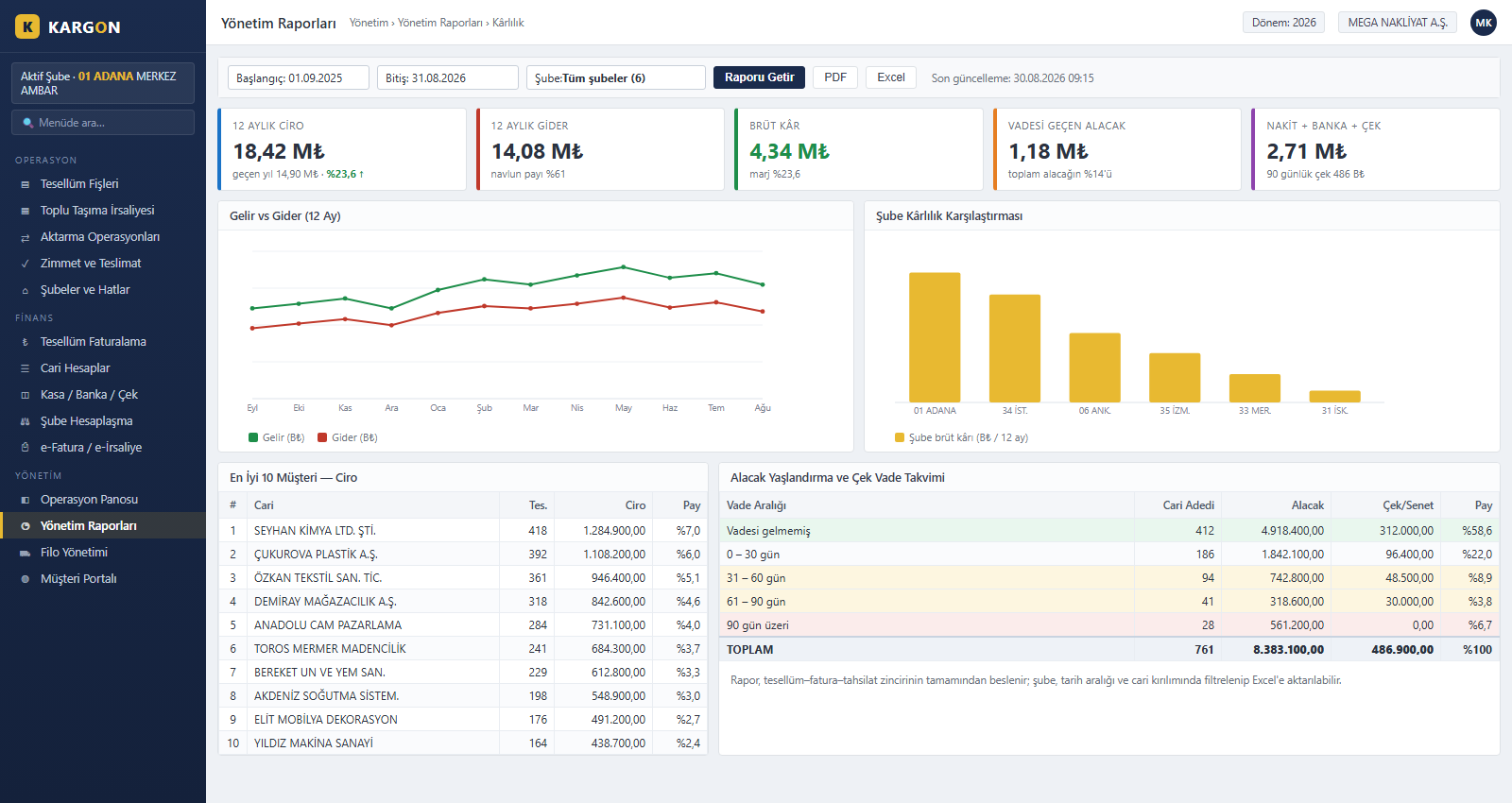
Management Reports and Profitability Analysis
A twelve-month income and expense trend, gross margin, branch profitability comparison, top customers and receivables ageing are gathered in one panel. Reports are fed by the consignment–invoice–collection chain and need no separate data entry; all of them filter by branch and date range and export to PDF or Excel.
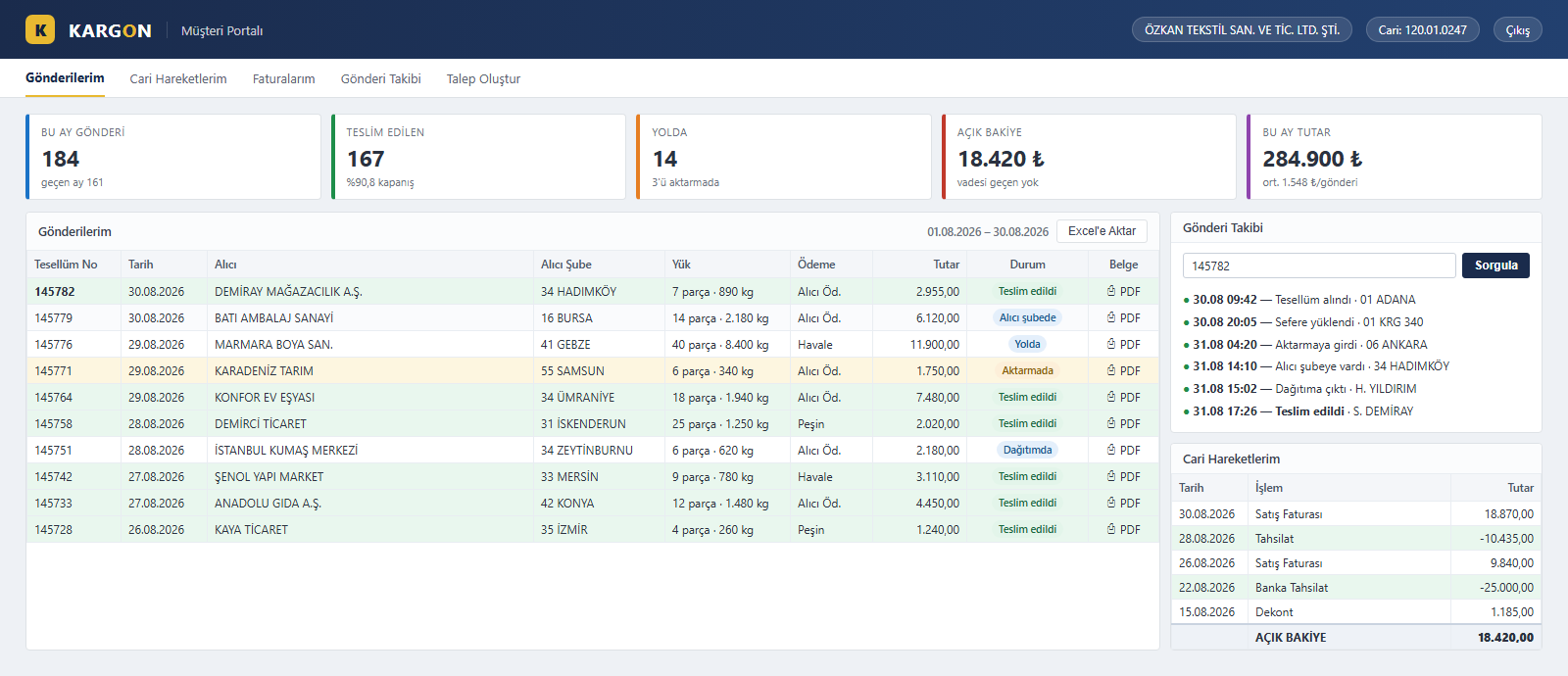
Customer and B2B Portal
Customers sign in with their own account through a separate link, independent of the internal permission system, with no ERP user to create. They see their own shipments, cargo details, amounts and current status, and download documents as PDF. Shipment tracking is listed step by step from consignment to delivery; the open balance and account movements are on the same screen.
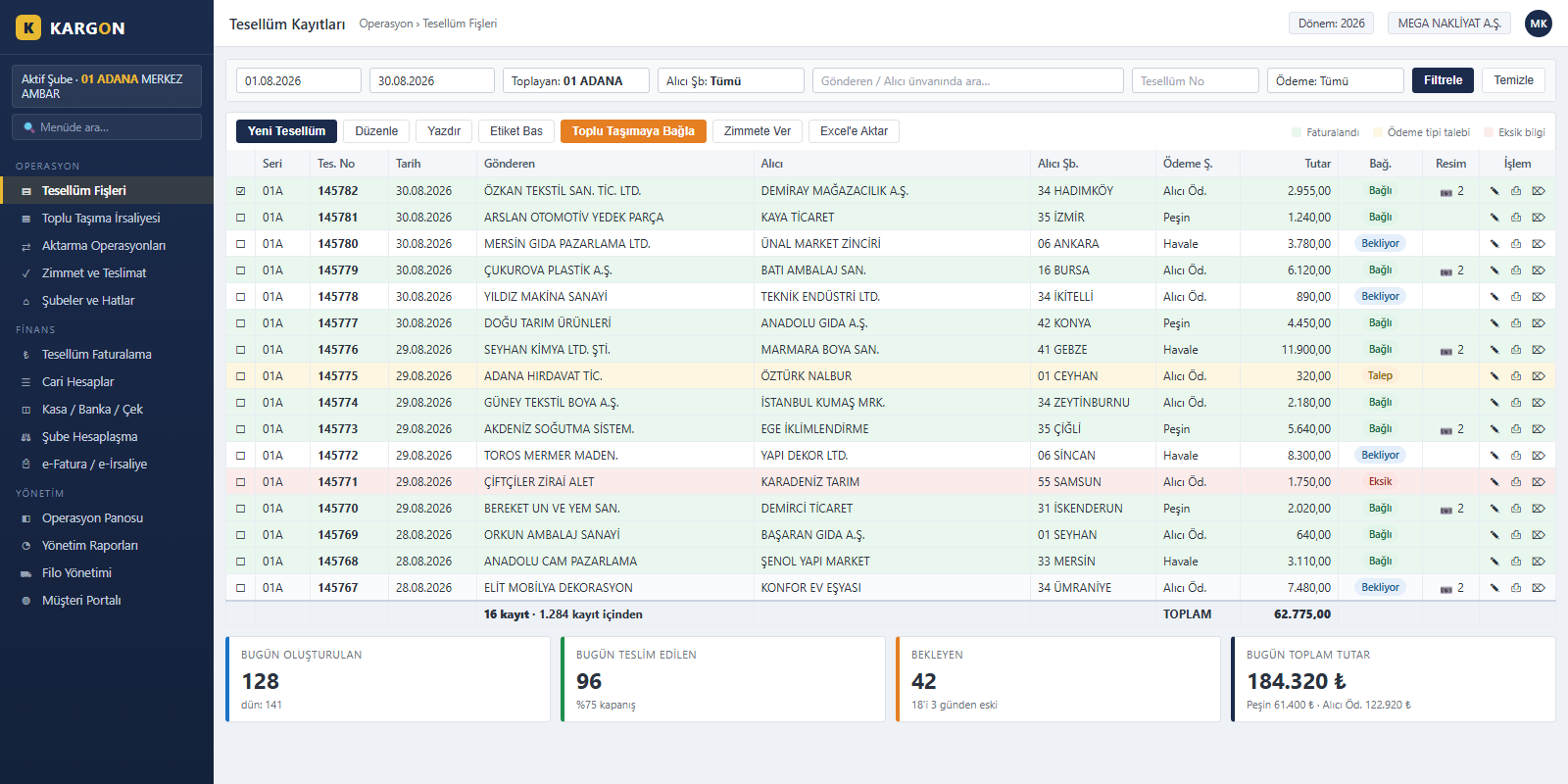
Consignment Records and Daily Tracking
Filtered by date range, branch, payment method and account title, the list brings the entire day onto one screen. Invoiced records show green, those awaiting a payment-type change yellow, and incomplete ones red. Selected records are linked to a waybill, assigned for delivery or invoiced in a single action; daily totals appear along the bottom.
All Modules on One Screen
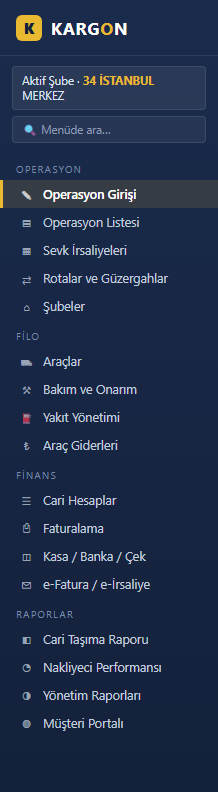
Kargon is not a single module but a platform covering the whole depot operation: consignments and dispatch, bulk transport waybills and linking, transfer hubs, delivery assignment, inter-branch settlement, current accounts, cash, bank and cheques, consignment-based invoicing, e-Invoice, fleet, workflow, the customer portal and management reports. Accounting, CRM and Human Resources modules are optional.
KargonLite™ International
For international transport companies
Manage export, import and transit trips from the same screen as your domestic operations. Countries and border gates, Incoterms, HS codes, dangerous and temperature-controlled goods, T1/T2 and TIR carnets, MRN, customs status and foreign-currency freight are held in a single record, and vehicle and driver documents are checked against the trip date.
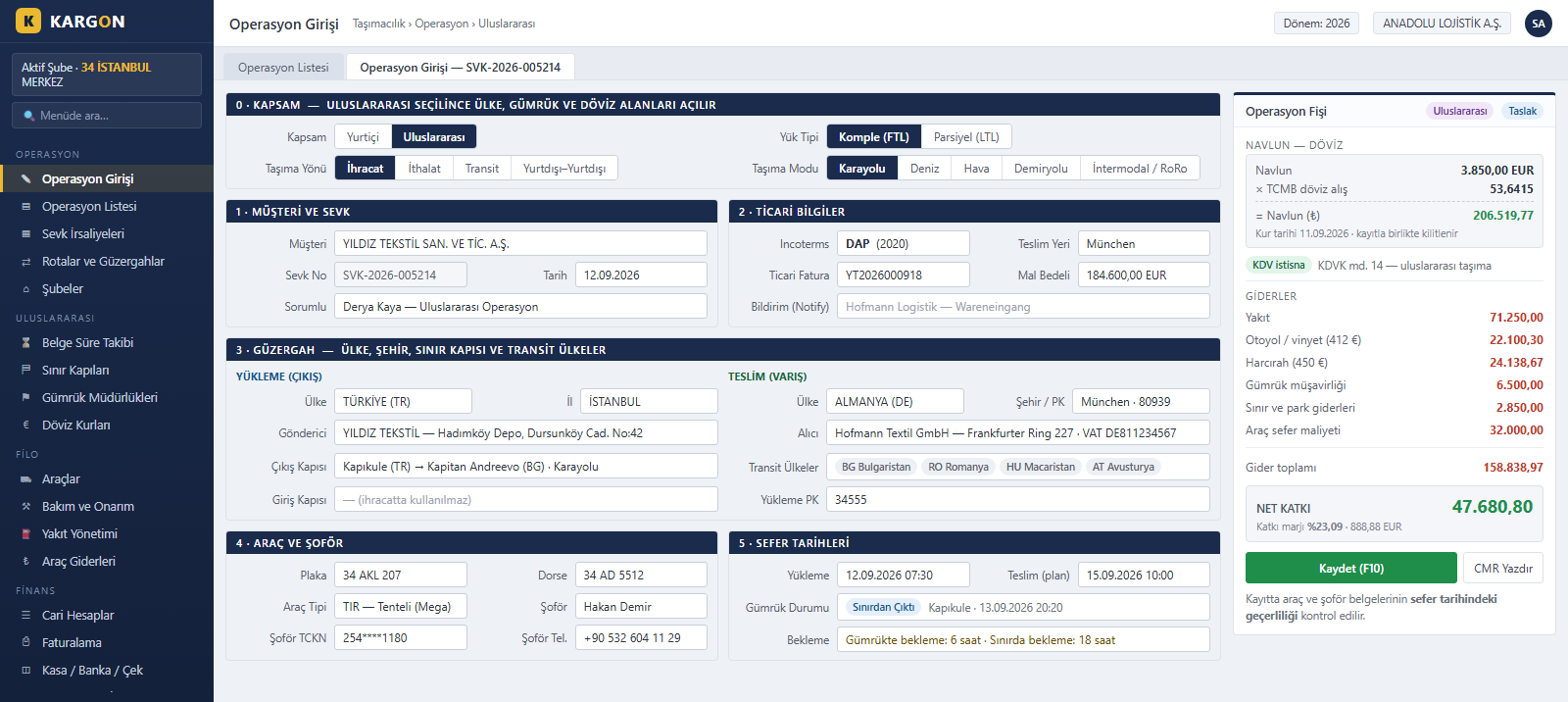
International Operation Entry on One Screen
When the scope is set to international, the operation screen adds transport direction (export, import, transit), transport mode, loading and delivery countries, border gate, transit countries and Incoterms. Freight is entered in foreign currency; its TRY equivalent is calculated instantly at the Central Bank (TCMB) rate, the rate is stored with the record and the VAT exemption is applied.
Customs, Transit Documents and Waiting Times
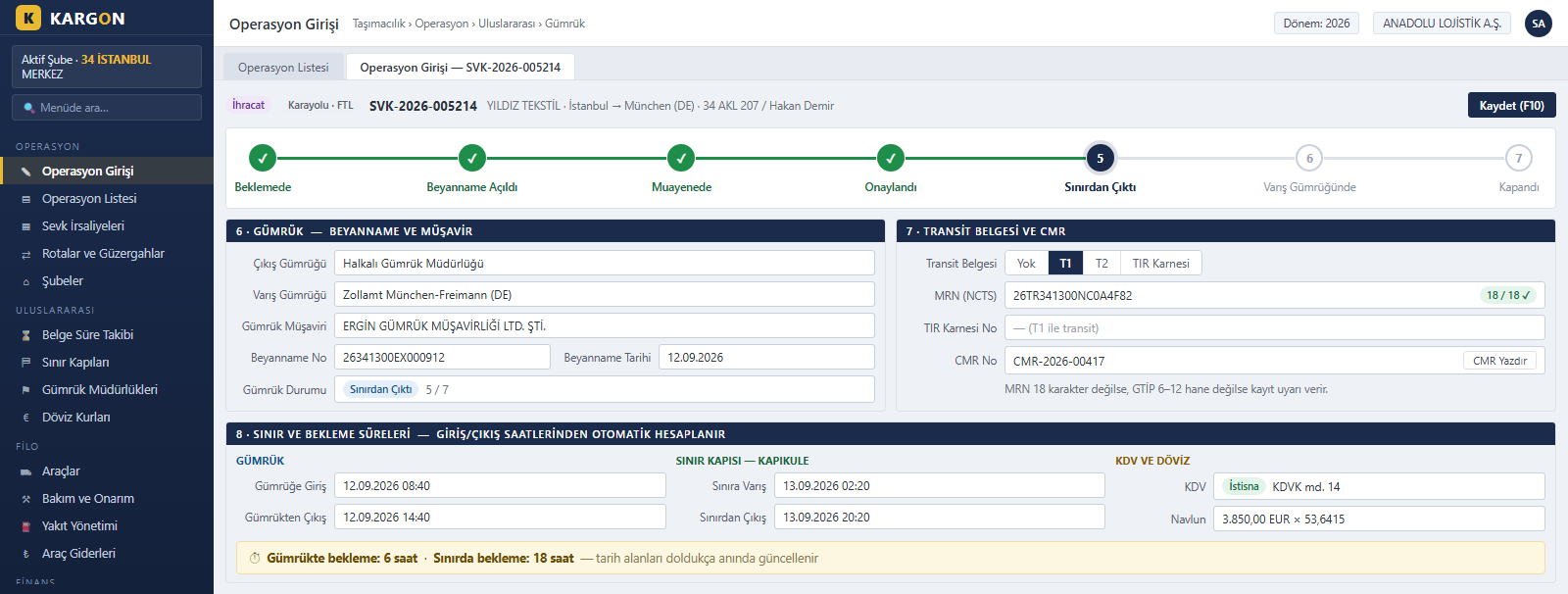
Departure and destination customs, the customs broker and declaration details are kept with the operation. T1, T2 or a TIR carnet is selected and the 18-character MRN is validated. Customs status is tracked in seven stages, and waiting times are calculated automatically from customs and border entry and exit times.
Cargo, ADR and Temperature-Controlled Loads
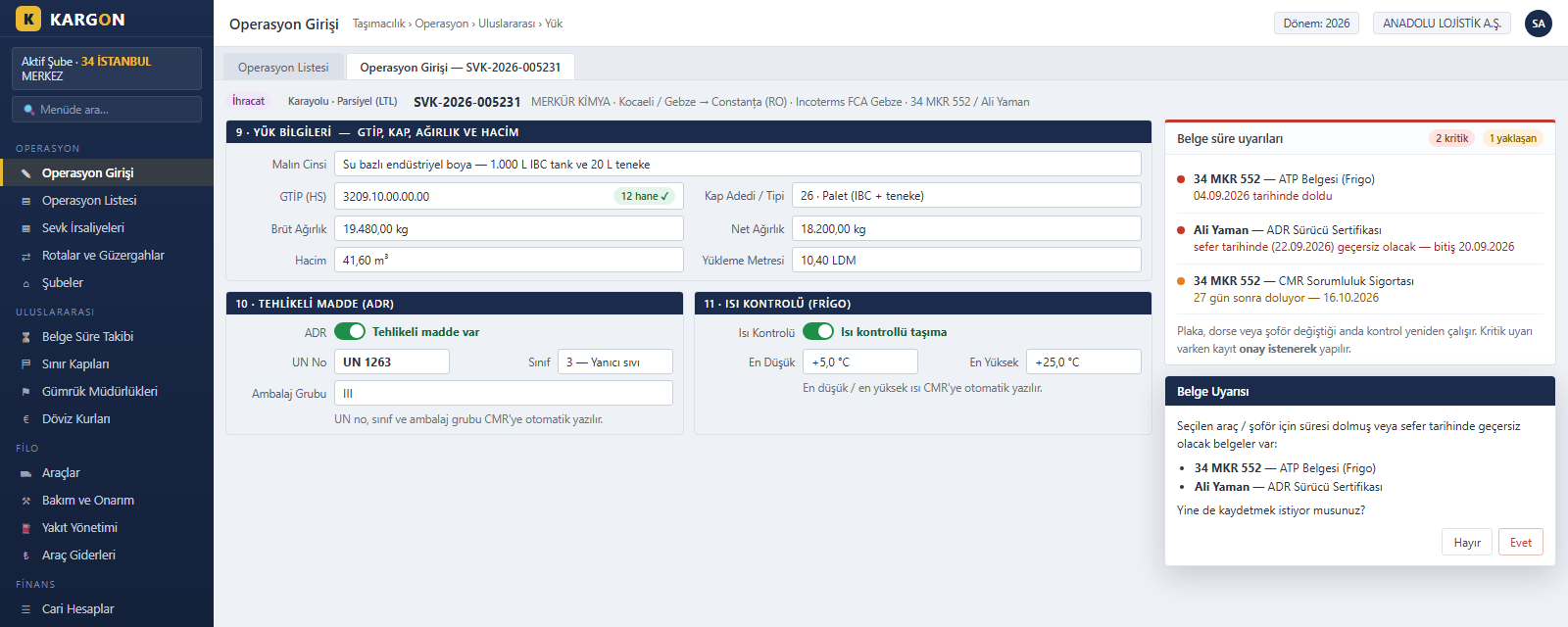
HS code, package count, gross and net weight, volume and loading metres are entered, and the HS code length is checked. For dangerous goods the UN number, class and packing group are held; for temperature-controlled loads the minimum and maximum temperature. If a document of the selected vehicle or driver is invalid on the trip date, a warning appears before saving.
Vehicle and Driver Document Expiry Tracking
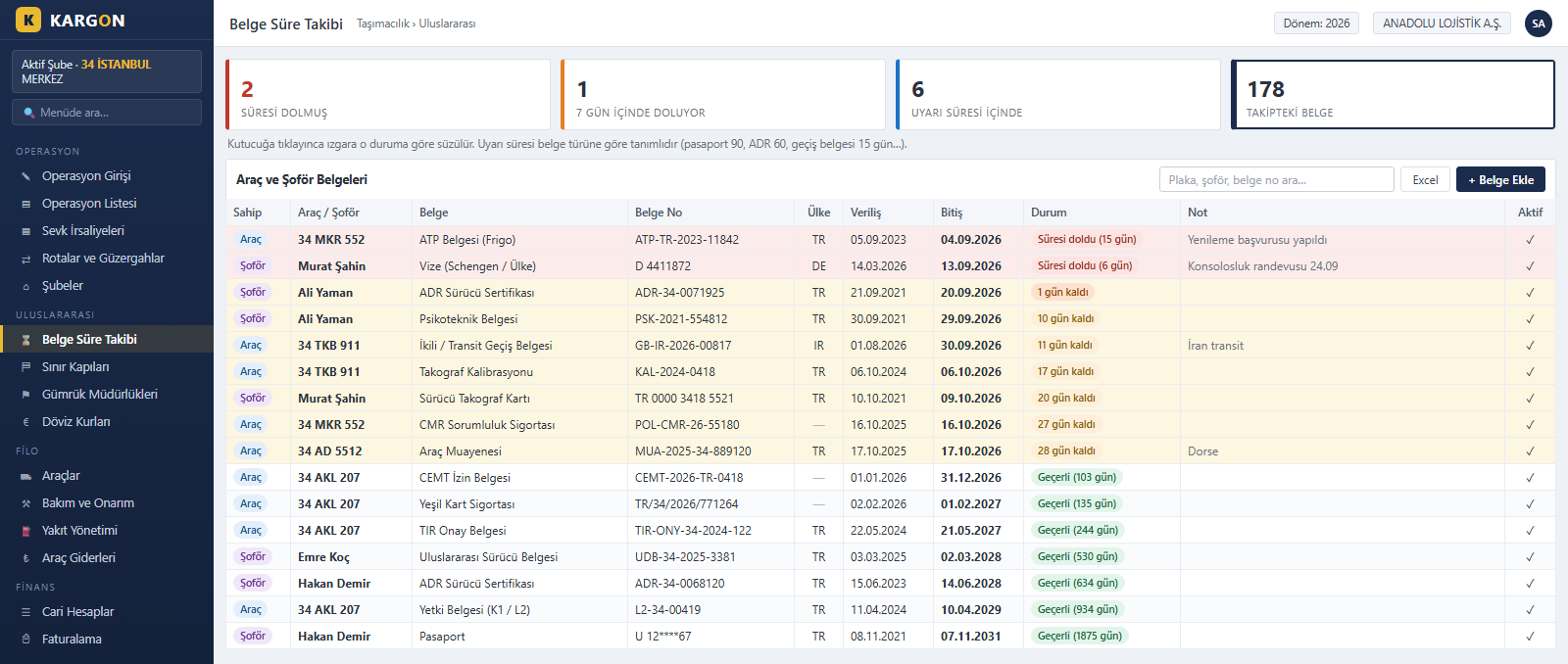
Vehicle documents such as CEMT permits, TIR approval, ATP, green card, CMR insurance and tachograph calibration, and driver documents such as passports, visas, ADR certificates and tachograph cards are tracked by expiry date. Each document type has its own warning period; expired documents, those expiring within seven days and those inside the warning period are filtered with one click.
Automatic CMR from the Operation
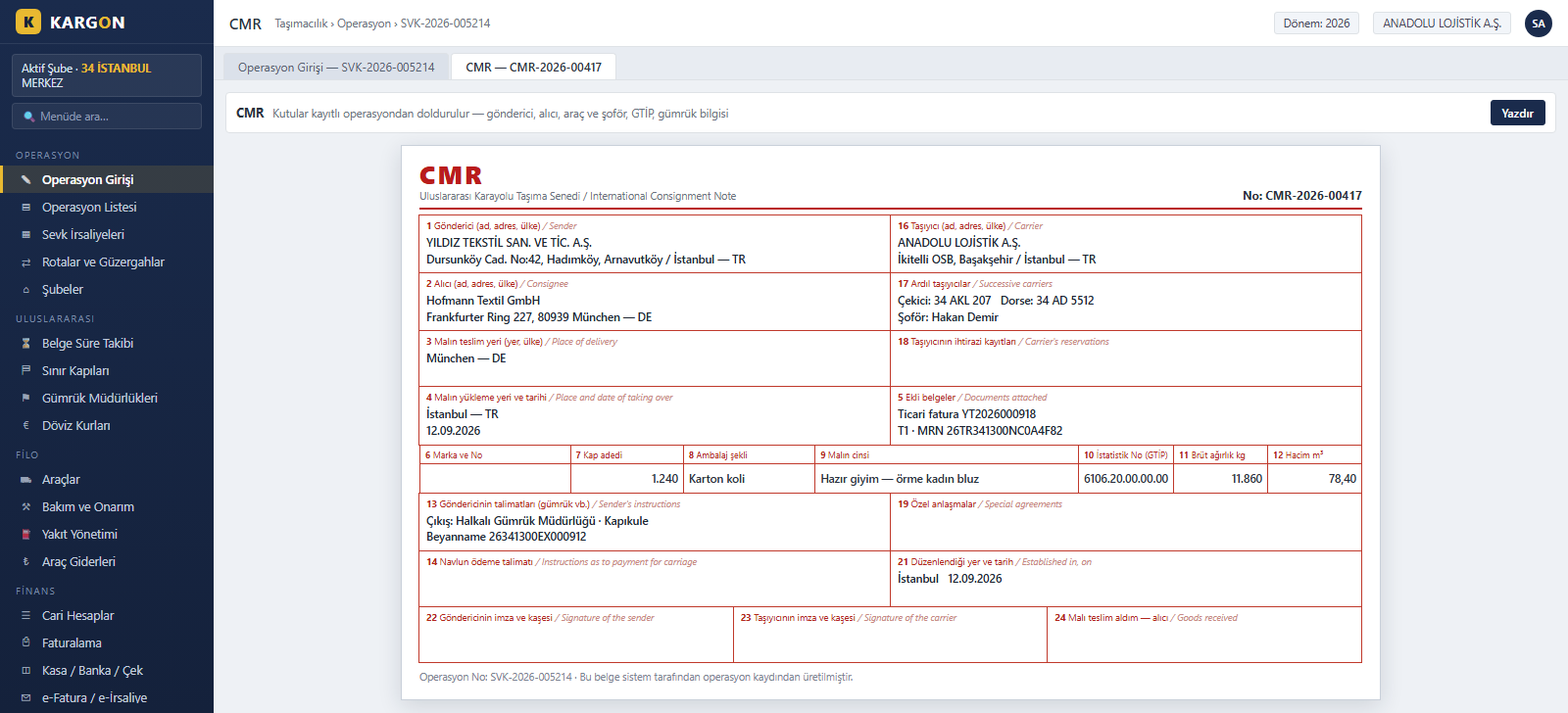
A CMR consignment note is produced from the saved operation in one click. Sender, consignee, carrier, truck, trailer and driver, place of loading and delivery, HS code, package count, gross weight, volume and customs instructions fill the boxes automatically; dangerous goods and temperature details are added on a separate line when present.
International Operation List
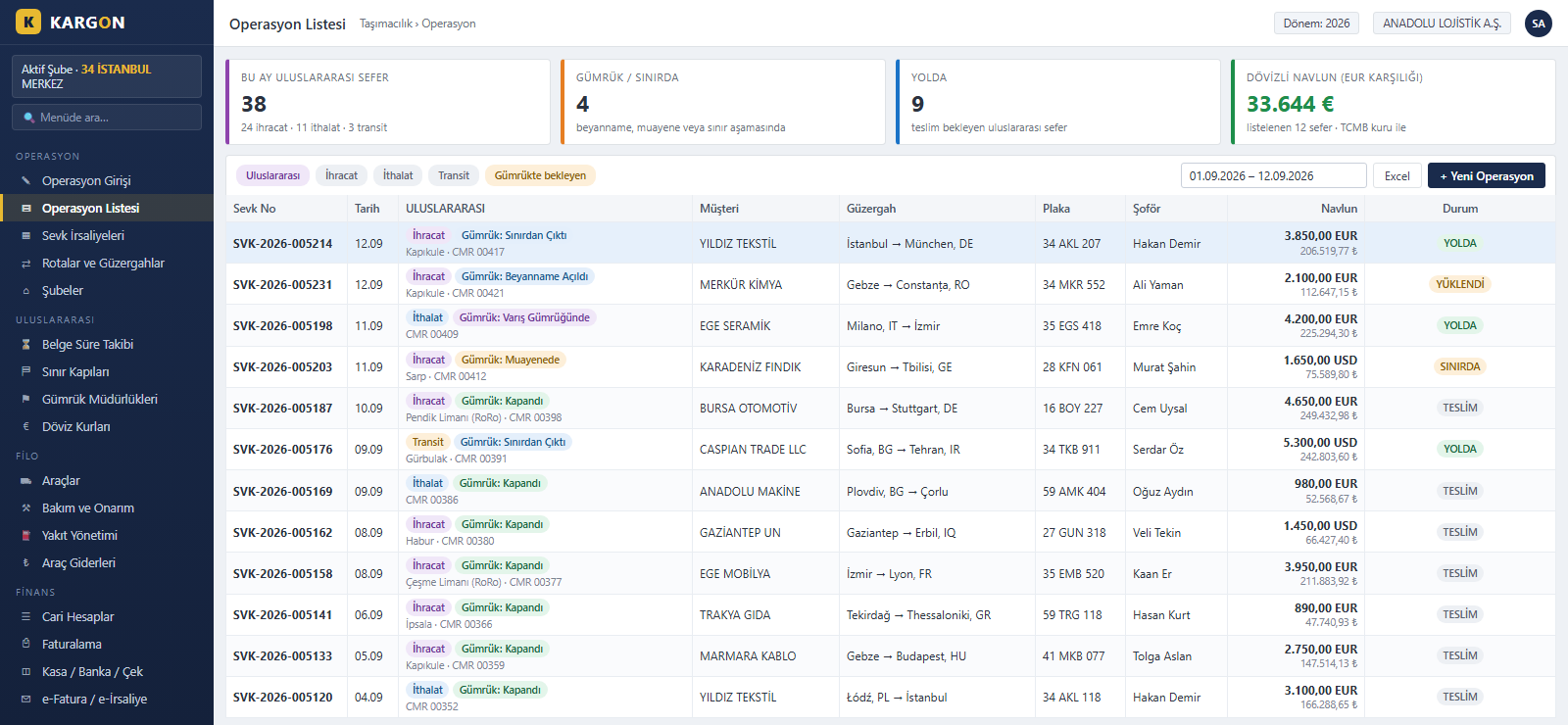
The international column in the operation list shows each trip's direction, customs status, exit border gate and CMR number in a single cell. Freight is listed in its currency and in TRY; trips waiting at customs or on the road stand out immediately, and the list can be exported to Excel.
Central Bank (TCMB) Exchange Rates
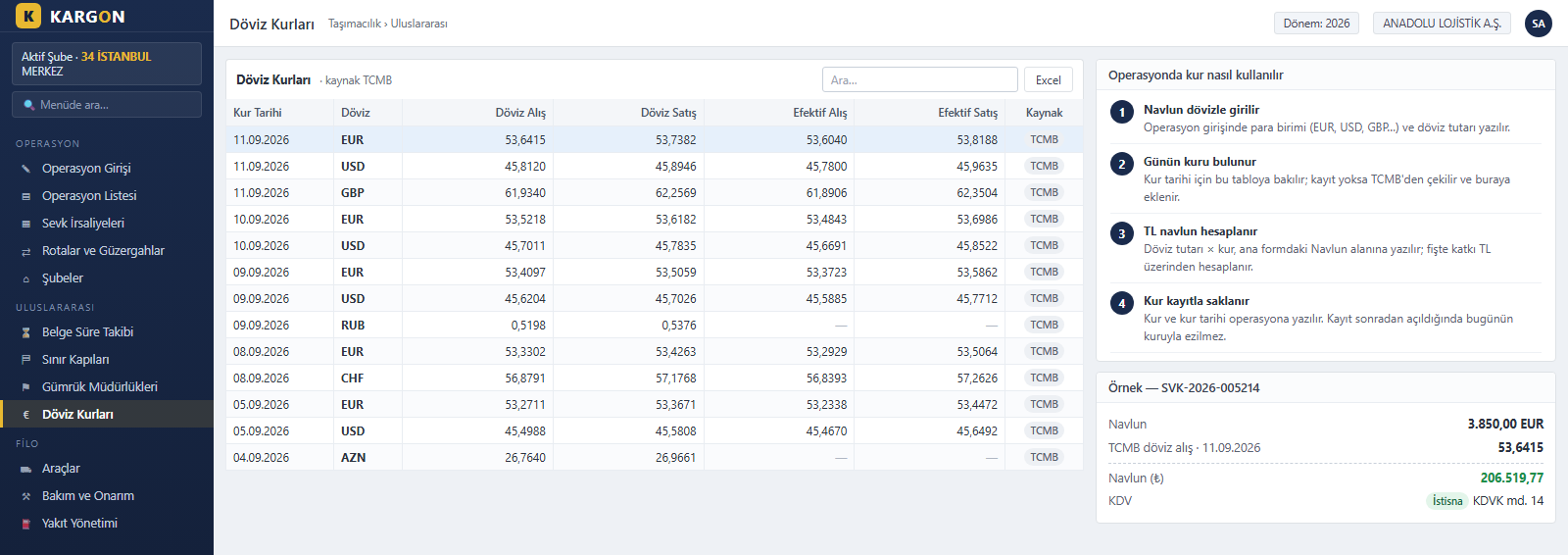
When foreign-currency freight is entered, that day's rate is read from this table; if it is missing, it is fetched from the Central Bank of the Republic of Türkiye and stored. EUR, USD, GBP and other defined currencies are supported. The rate and its date are written to the operation, so reopening a record never overwrites it with today's rate.
Border Gates and Customs Offices
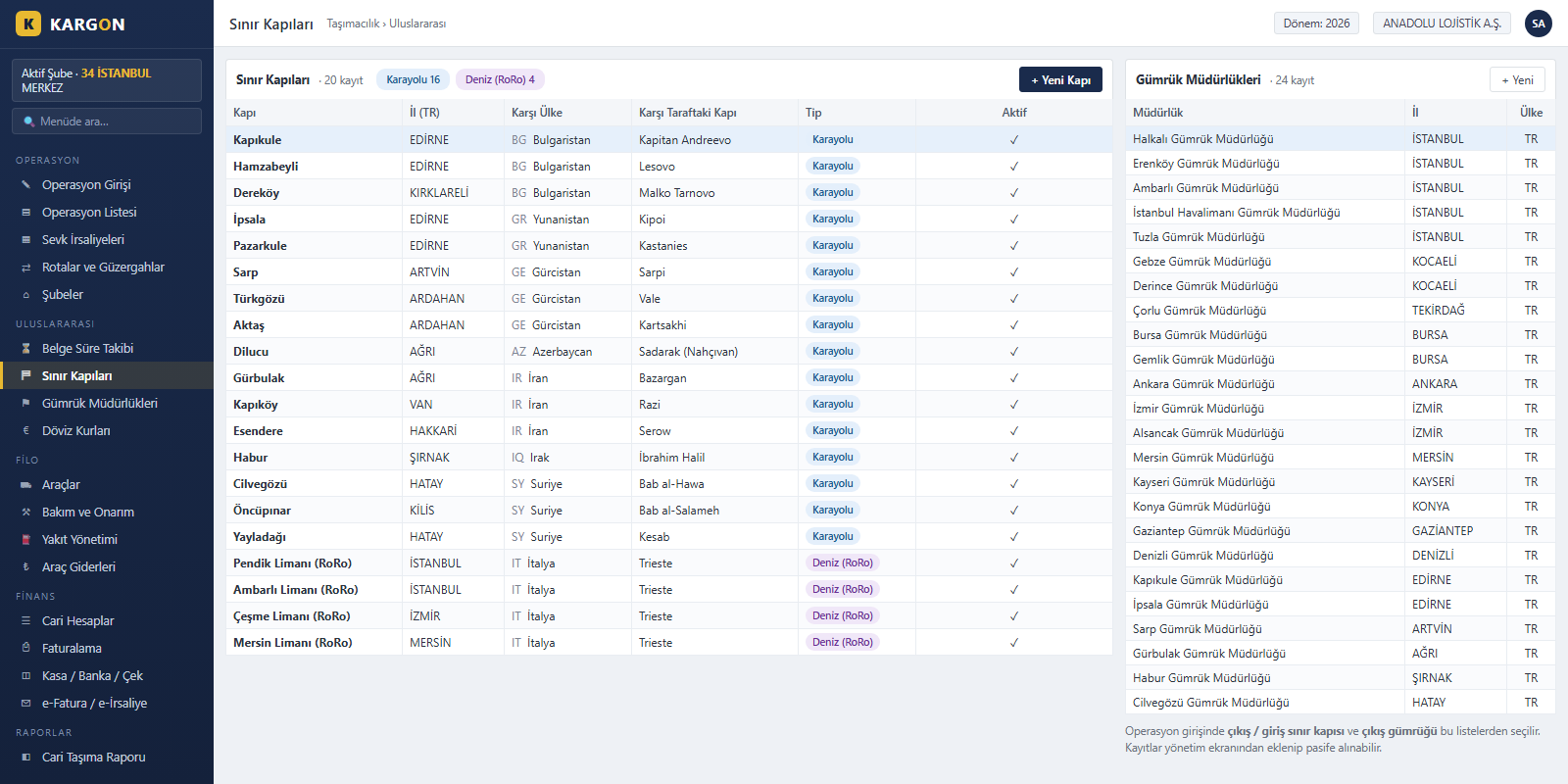
Land border gates such as Kapıkule, Sarp, Gürbulak and Habur, together with RoRo ports, come ready with the neighbouring country and the gate on the other side. Along with customs offices they serve as selection lists in operation entry; new records can be added and unused ones deactivated.
All Modules on One Screen
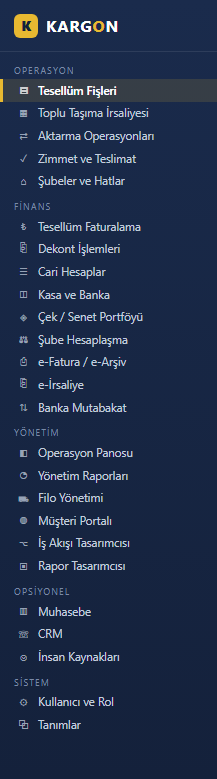
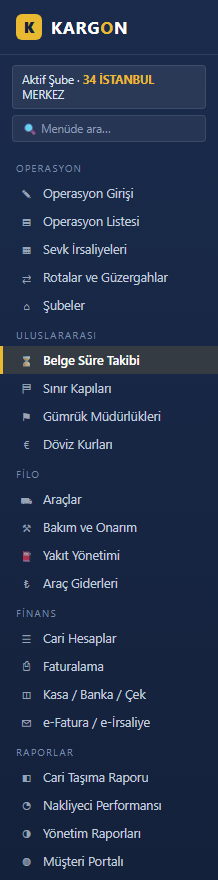
The international module runs on the same platform as the domestic operation, fleet, account and invoicing modules: international operation entry, customs and transit tracking, CMR, document expiry tracking, border gates, customs offices and Central Bank exchange rates. The module is enabled per user; users without access do not see these screens.
Details
About Kargon™ and KargonLite™
One platform, three solutions: KargonLite™ brings trip, freight and fleet management to carriers moving full and partial truckloads, plus customs, CMR and foreign-currency freight for export, import and transit trips; Kargon™ covers consignment receipts, transfer hubs, delivery assignment and inter-branch settlement for groupage depot carriers.
At Triyon Yazılım we deliver solutions tailored to your needs in this field. Thanks to its modular structure it can be integrated into your existing processes and configured according to your reporting and authorization requirements. For detailed information and a demo request, reach us through our contact page.
Contact Us