Products
DOYS™
Built for schools, courses and learning centres, DOYS™ brings lesson scheduling, attendance, course-based payment tracking, make-up and approval flows and end-of-year show organisation onto a single platform. It runs the same way for a music school teaching one-to-one lessons and for a multi-branch learning centre. School administration works in the web panel; students, parents and teachers use the free mobile app.
Software Screenshots
What can you do with DOYS™?
Administration Panel: The School's Day on One Screen
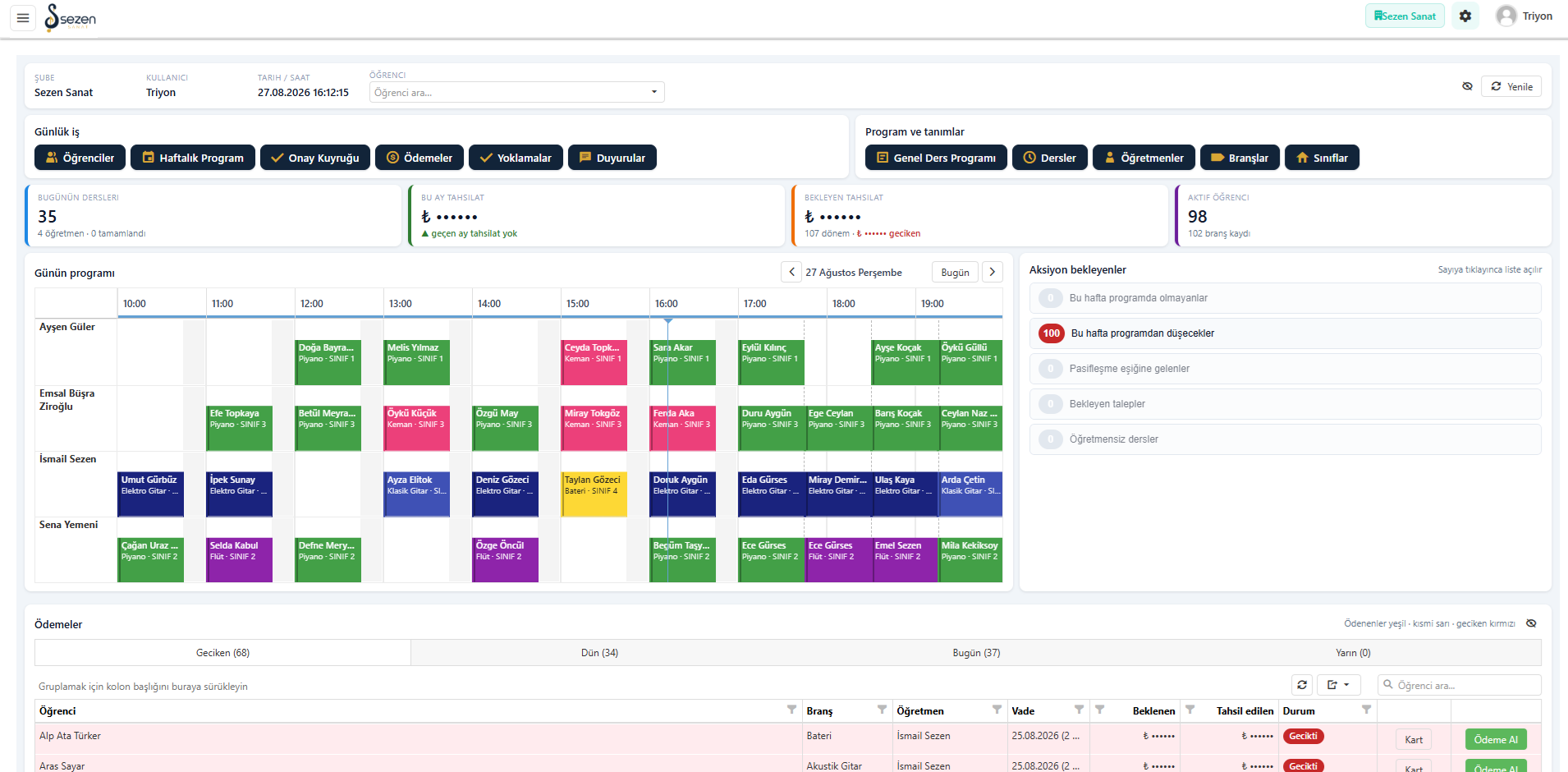
Administration starts the day on a single screen. Today's lesson count, the month's collections, outstanding collections and active student totals sit along the top. The day's programme opens hour by hour along teacher rows, with overdue, yesterday's and today's payments tabbed underneath. The action list on the right counts students missing from this week's schedule, lessons about to drop out and pending requests; clicking a count opens that list.
Weekly Lesson Calendar and Clash Control
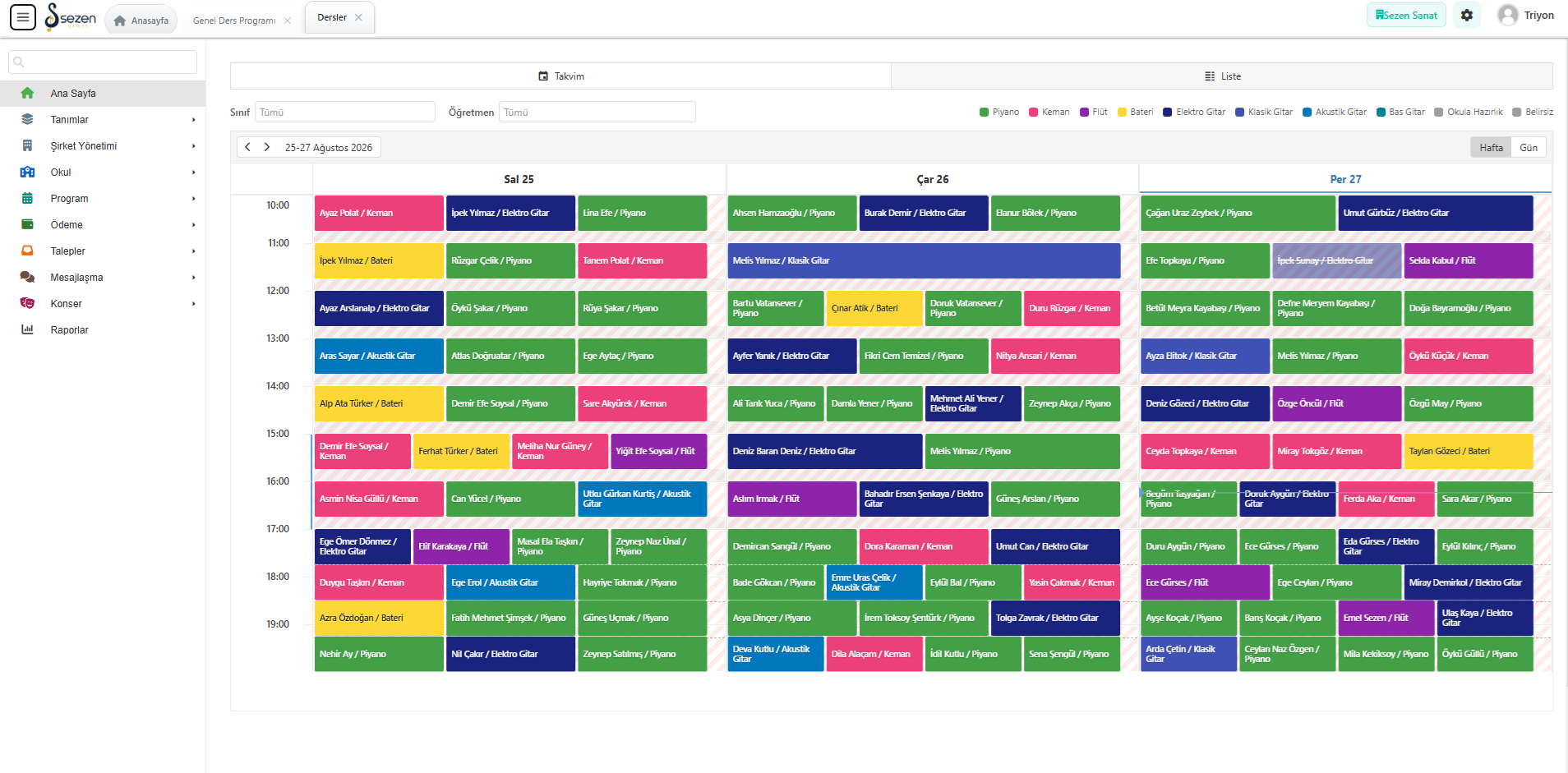
The lessons screen shows the week as a calendar or a list and narrows it by classroom and teacher. Every lesson block carries the student and the course, and courses are separated by colour. Because the timetable is generated from the winter or summer season template, student, teacher and classroom clashes are prevented during placement. Hatched blocks mark status changes such as cancellations and make-up lessons, and you can switch between day and week views.
Revenue and Collection Reports
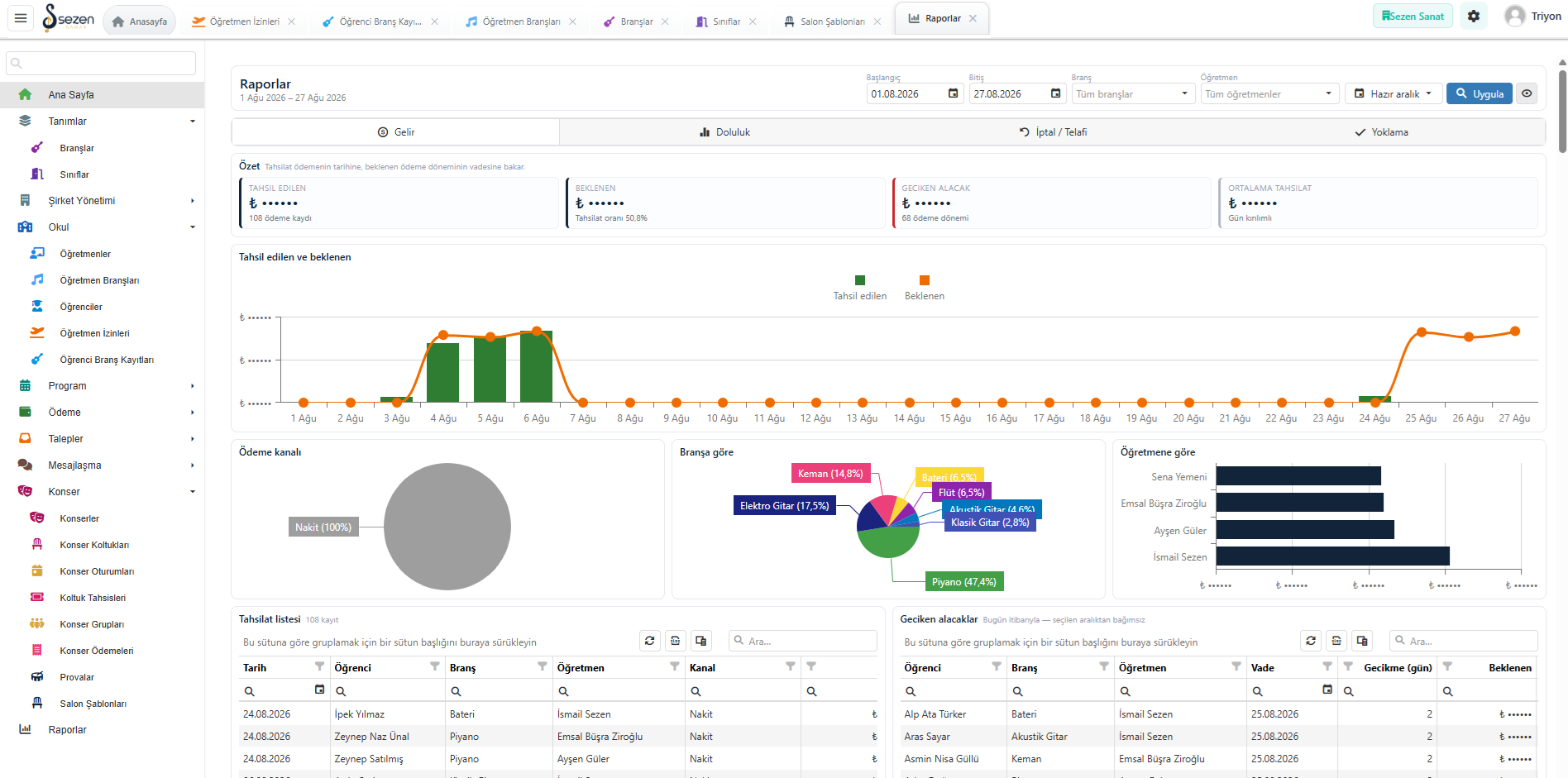
The reports screen examines the selected date range through revenue, occupancy, cancellation/make-up and attendance tabs. The revenue tab carries summaries for collected, expected, overdue and average amounts alongside the daily collection curve. Payment channel, distribution by course and breakdown by teacher appear on the same screen. The collection list works next to overdue receivables, so you see where the term stands before it closes.
Occupancy and Capacity Analysis
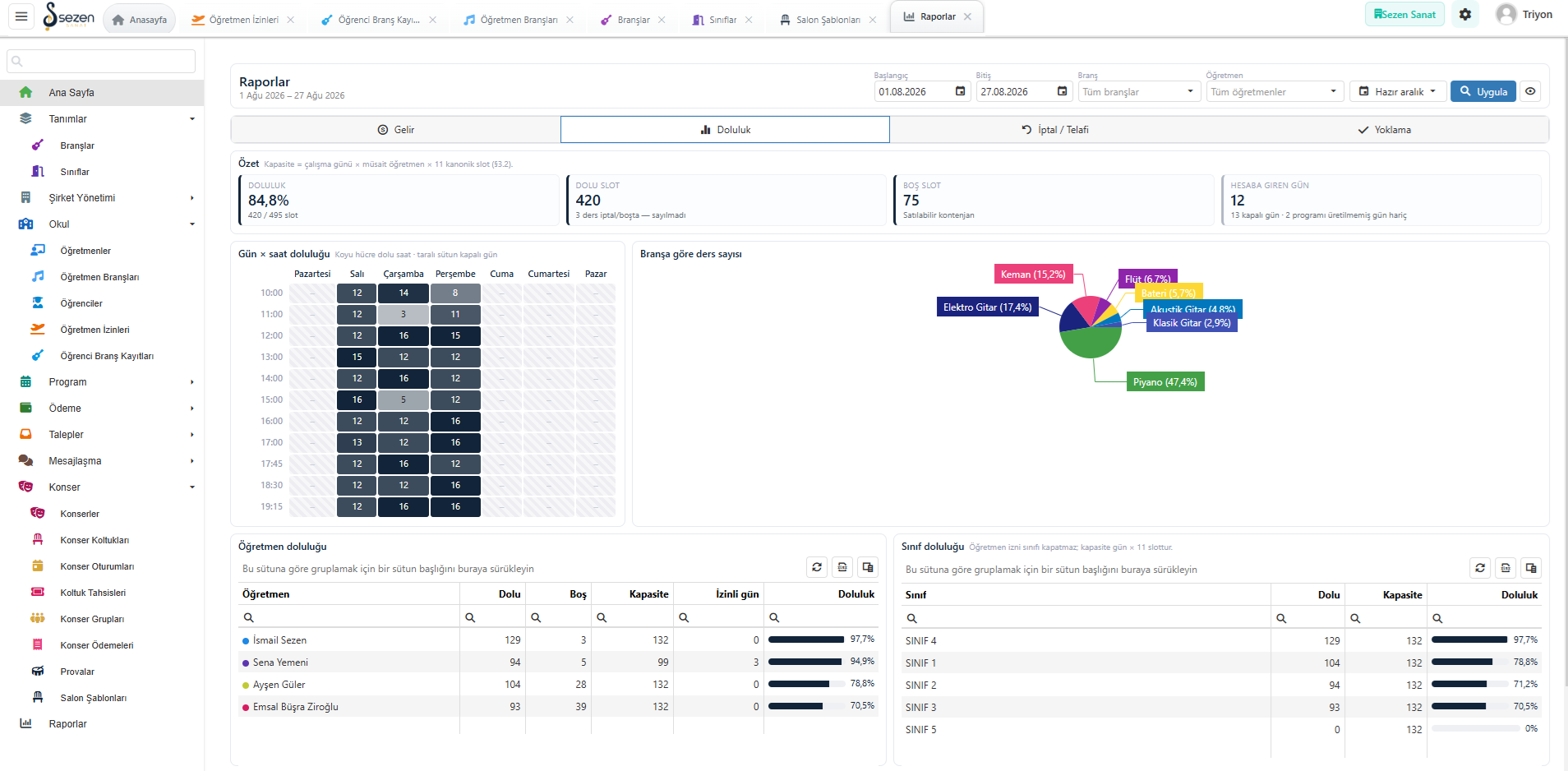
The occupancy tab shows how much of the capacity is in use: filled and free slot counts, the occupancy rate and the days counted sit in summary cards. A day-by-hour heat table reveals which hours are full and which are empty. Teacher and classroom occupancy are listed in separate tables with capacity, leave days and rate, so a new enrolment is assigned to an hour and a teacher on the basis of data.
One App, Your Institution's Own Installation
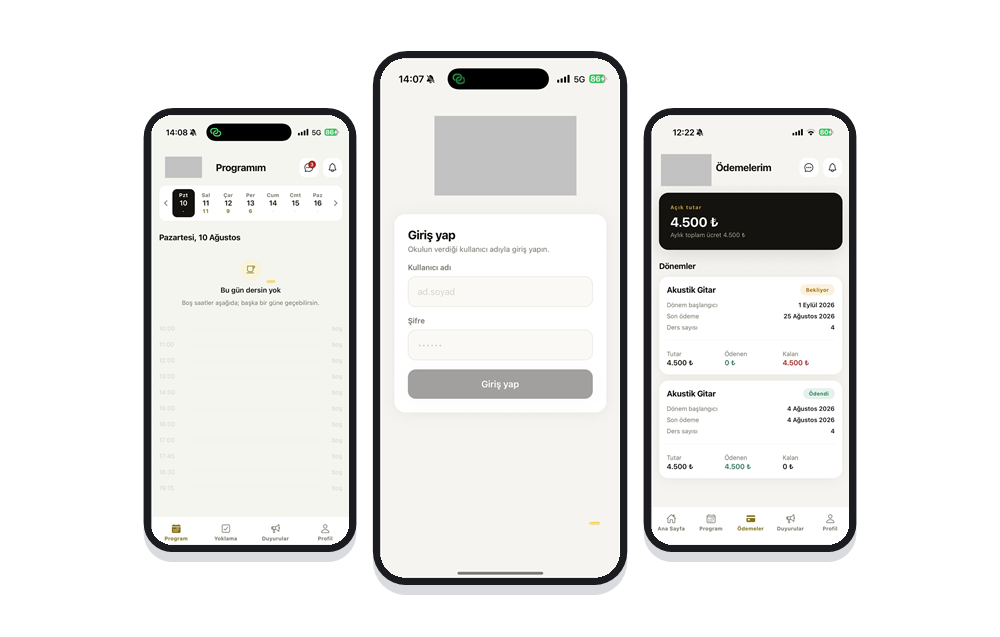
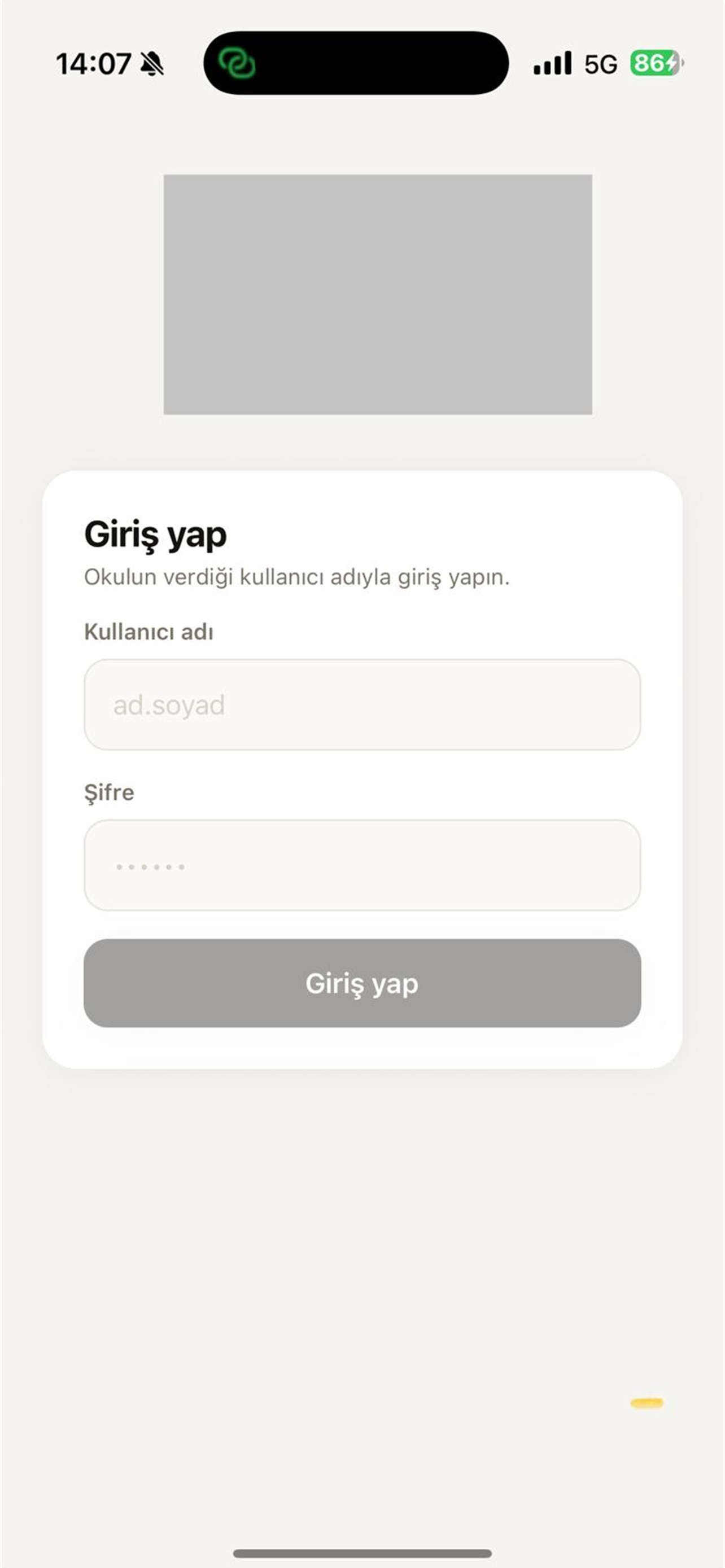
Students, parents and teachers download the single DOYS™ app from the store and sign in with the username their school issues. At sign-in the app finds that institution's own server automatically and opens with its logo and colours. No new store release is required when another institution subscribes. Each institution's data stays in its own installation and its own database; institutions cannot see one another or one another's students.
The Weekly Lesson Schedule in Your Pocket
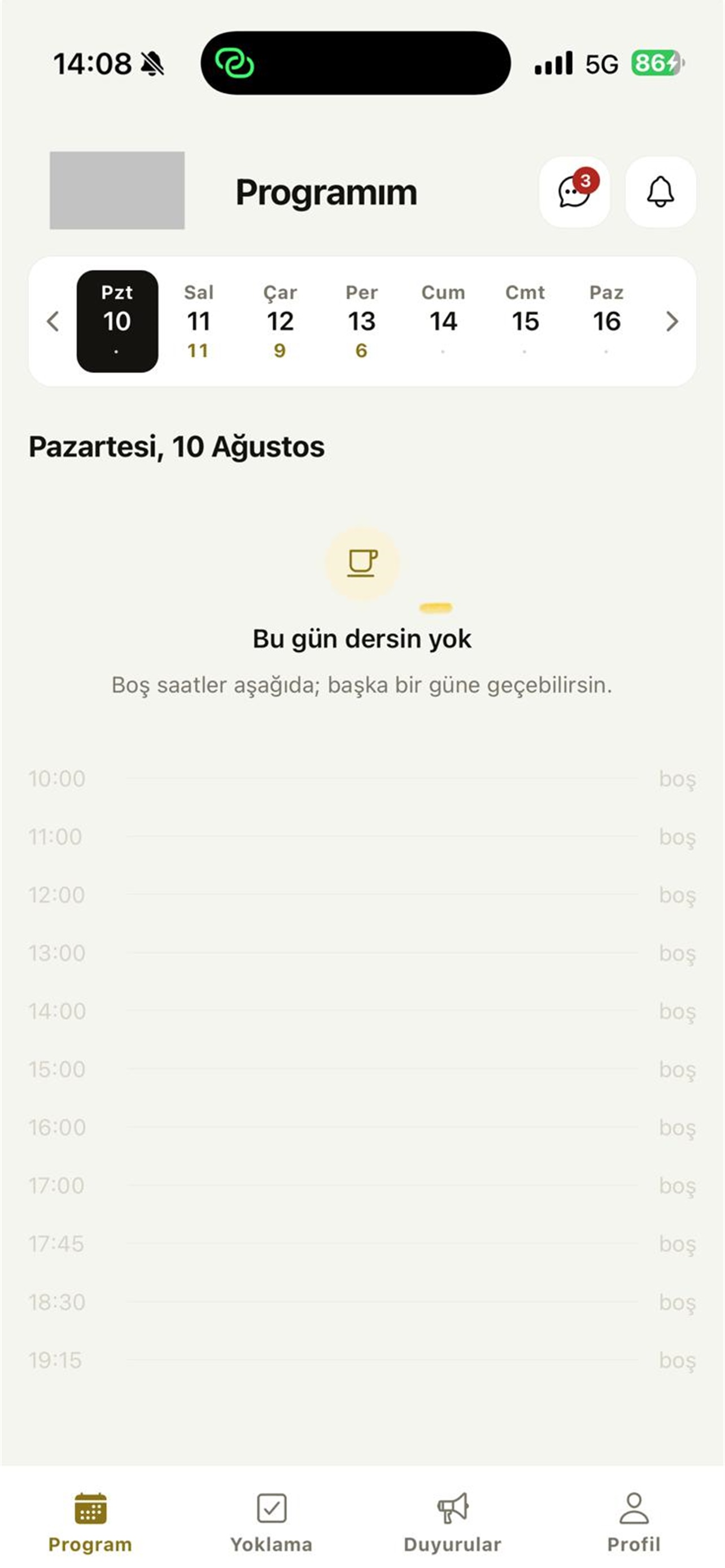
Students and teachers follow their weekly schedule from their phone. The day strip shows how many lessons fall on each day; the selected day lists its lesson times together with the room and the teacher, and free hours are marked separately. Because the schedule is generated from the winter or summer season template, any change to a lesson time updates the phone view instantly and is announced by notification.
Course-Based Payment Tracking
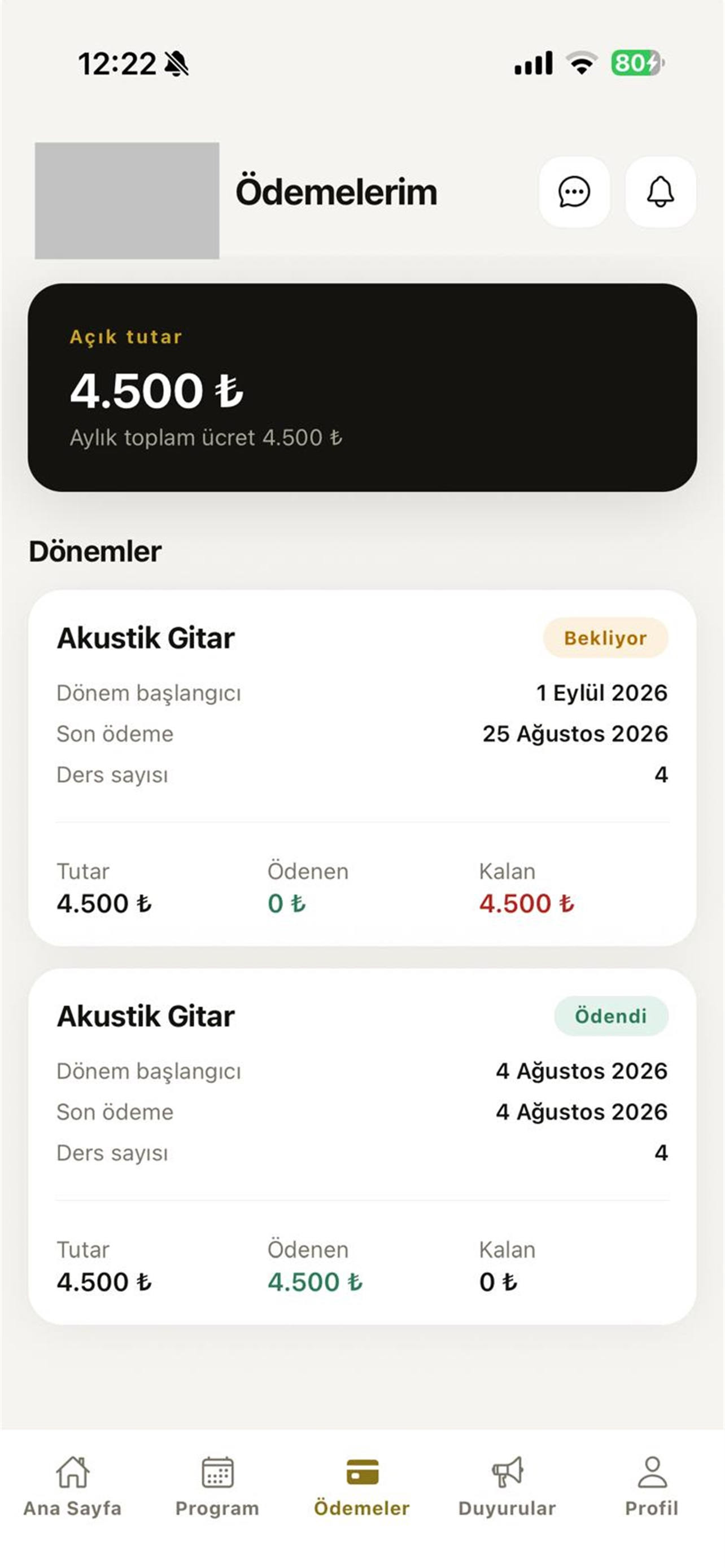
Every course has its own payment chain. Terms open as four-lesson blocks, and both student and parent see the amount, the paid part and the balance for each course separately. Paying for one course does not advance another course's term; the slot of a course in arrears is left out of the schedule while the other course continues. A reminder arrives before the due date; payment is made directly to the institution and the app only shows its status.
Features
What does DOYS™ cover?
Lesson Schedule and Weekly Timetable
Two general programme templates are defined, winter and summer, and the weekly timetable is generated from them automatically. While the timetable is built, the system prevents student, teacher and classroom clashes, so no two lessons land on the same slot. When a teacher takes leave, a substitute teacher can be assigned to the affected lessons. Students and teachers follow their own up-to-date schedule from their phone.
Attendance and Absence Tracking
The teacher marks the lesson from their phone; attendance, lateness and absence reach the student and the parent immediately. Lessons still awaiting attendance sit in a separate list on the teacher's screen, so nothing is skipped. Learning outcomes and homework notes can be recorded at the end of each lesson, and the attendance history stays available to both the student and school administration throughout the term.
Course-Based Payment Tracking
A student can take more than one course, and each course has its own teacher, its own slot and its own payment chain. Fees run in four-lesson terms; the paid amount and the balance are visible to student and parent transparently. The slot of a course in arrears is left out of the schedule while the other course continues. A payment reminder is sent before the due date.
Requests and Approval Flows
Lesson cancellation, make-up lesson and permanent lesson-time change requests are opened from the app; school administration approves or rejects them. Make-up and cancellation rights follow the rules the institution sets. Every approval and every rejection produces a notification for the student, and the reason for a rejection is shown. A permanent time change is a separate flow, and once approved the previous and the new teacher are informed as well.
Season Day and Time Selection
When a new term opens, students receive a notification and submit one to three day-and-time preferences from the app. School administration reviews the preferences and completes the placement, with clash checking running automatically during placement. Students who have not chosen receive a reminder. The phone traffic of the season opening disappears and placement is completed centrally, on the record.
Announcements, Notifications and Messaging
Announcements are published to the whole institution or only to selected courses or classes, and reach the phone as an instant push notification. Secure in-house messaging runs between the teacher and the student or parent, with photos and video. The institution can restrict the hours during which messaging is open, so communication stays within the boundaries it sets.
Shows, Rehearsals and Seat Reservation
Sessions such as matinee and evening are defined under an end-of-year show or concert, and the groups that take the stage together are defined under a session. Each group has its own rehearsal calendar and its own rehearsal attendance. The hall's seat map is set up once and reused in later years. Families choose seats from a live occupied/free map in the app; double booking is blocked and the seat quota is set per session.
Administration Panel and Reports
The web administration panel is for school administration: student and teacher records, course and classroom definitions, schedule publishing, the approval queue, collections and reporting are all run from one place. Revenue, occupancy, cancellation/make-up and attendance reports are gathered on one screen. Role-based permissions determine who can see and change what, and every change is kept as an audit log entry.
Student Progress and Lesson Notes
Level and achievement records are kept per course, and the outcome and homework notes the teacher enters after each lesson are added to that history. Students and parents see their own progress history in the app, while school administration can assess progress within the term by course and by teacher. Conversations with parents then rest on recorded data.
Web Administration Panel
School administration runs everything from the web panel: student and teacher records, course, classroom and season definitions, schedule publishing, the approval queue, collection tracking, announcements, show management and reports all live in one place. Role-based permissions decide who can see and change what, and every change is kept as an audit log entry.
Mobile App
One app, two roles: student/parent and teacher
The DOYS™ mobile app is a single app for students, parents and teachers; after signing in, each user sees different screens according to their role. The student, parent and teacher surface is mobile only. The web panel is for school administration alone, and students never sign in to it.
Student and Parent
The weekly lesson schedule, the room and teacher of each lesson, cancellation and make-up requests, season day-and-time preferences, course-based payment status, announcements, messaging with the teacher and show seat selection are all handled in one app.
Teacher
The daily and weekly timetable, taking attendance, the list of lessons awaiting attendance, rehearsal attendance, incoming student requests and messaging with students and parents are gathered on the teacher's own screens.
Free for students, parents and teachers
The app is free for students, parents and teachers on the App Store and Google Play, and there are no in-app purchases. The institution pays for the platform as a business-to-business subscription.
No separate app is published per institution
There is a single DOYS™ app in the stores. When a student signs in, the app finds their own institution's server automatically and opens with its logo and colours; no new release is needed when another institution subscribes.
Data separation between institutions
Each institution's data is kept in its own installation and its own database. Institutions cannot see one another or one another's students, and permissions are defined within the institution's own users.
Instant notifications
Notifications are sent when the schedule is published, when a lesson changes or is cancelled, when a request is approved or rejected, for make-up and payment reminders, and for every new message and announcement.
Contact us for the store availability of the app and the installation timeline.
Details
About DOYS™
Built for schools, courses and learning centres, DOYS™ brings lesson scheduling, attendance, course-based payment tracking, make-up and approval flows and end-of-year show organisation onto a single platform. It runs the same way for a music school teaching one-to-one lessons and for a multi-branch learning centre. School administration works in the web panel; students, parents and teachers use the free mobile app.
About DOYS™
DOYS™ is a digital school management system shaped around the daily operation of schools, courses and learning centres. Everything from lesson scheduling and attendance to collections, request and approval flows and reporting runs on the same data. Processes specific to these institutions sit at the centre of the product: one-to-one lessons, separate fees per course, winter and summer season programmes, make-up rights, lesson-change approval flows and the end-of-year show. Installation, data migration and training are included in every package; students, courses, teachers and schedules are imported from Excel or from your current system. There is no long-term commitment, and the institution's own logo and colours are supported (white-label).
Why DOYS™?
A student can take more than one course, and each course has its own teacher, its own slot and its own payment chain. Paying for one course does not advance another course's term; the slot of a course in arrears is left out of the schedule while the other course continues. This separation, which most general-purpose school software cannot model, combines with season templates, make-up rights, occupancy reports and show seat management to bring the institution's whole operation onto one platform.
Our Core Solutions
- Schedule and Attendance Management: The weekly timetable generated from the winter or summer season template is built while student, teacher and classroom clashes are prevented. The teacher marks the lesson from their phone; attendance, lateness and absence reach the student and parent immediately, and lessons awaiting attendance are tracked in a separate list.
- Course-Based Collection Tracking: A separate payment chain per course, four-lesson term pricing and a transparent paid/remaining view. A reminder is sent as the due date approaches. Payment is made directly to the institution; the app only shows payment status and includes no online payment or virtual POS.
- Request, Approval and Placement Flows: Lesson cancellation, make-up lessons, permanent time changes and season day-and-time preferences are opened from the app, and school administration approves or rejects them from a single queue. Every decision is delivered by notification, the reason for a rejection is shown, and on a permanent change the previous and new teacher are informed.
- Reporting, Occupancy and Show Management: Revenue, occupancy, cancellation/make-up and attendance reports are gathered on one screen; the day-by-hour heat table and teacher/classroom capacity rates tie enrolment decisions to data. For the end-of-year show, sessions, groups and rehearsals are managed and families reserve seats live on the hall's seat map.
Who Is It For?
- Courses, study centres and learning centres teaching one-to-one or small-group lessons
- Music and art schools teaching disciplines such as piano, violin, guitar and drums
- Ballet, dance and performance schools and institutions that stage an end-of-year show
- Multi-branch education institutions and schools whose schedules outgrow manual management
DOYS™ does not belong to a single school, chain or institution. Every school, course and learning centre in Türkiye can subscribe; no corporate agreement, invitation or prior approval is required.
Bring your institution's lesson schedule, attendance, course-based collections and show organisation onto one platform with DOYS™. Request a quote for whichever of the Başlangıç, Standart and Kurumsal packages matches your student count; installation, data migration and training are included in all of them.
Request a DemoProduct site: doys.triyonsoft.com Support: doys.triyonsoft.com/destek Privacy policy: doys.triyonsoft.com/gizlilik
At Triyon Yazılım we deliver solutions tailored to your needs in this field. Thanks to its modular structure it can be integrated into your existing processes and configured according to your reporting and authorization requirements. For detailed information and a demo request, reach us through our contact page.
Contact Us